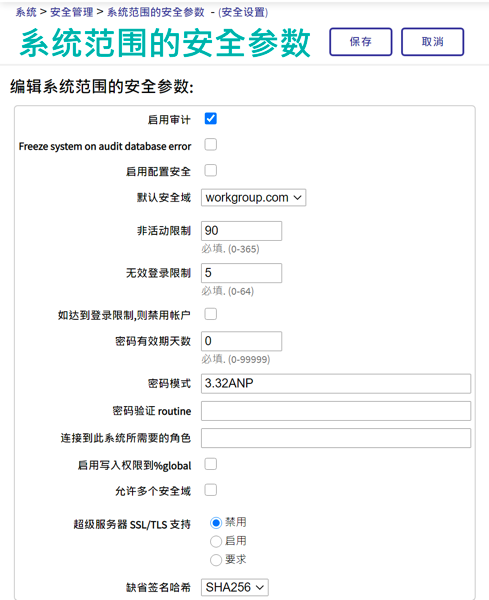
本文以及后面两篇该系列文章,是为需要在其基于 InterSystems 产品的应用程序中使用 OAuth 2.0 框架(下文简称为 OAUTH)的开发人员或系统管理员提供的指南。
作者:InterSystems 高级销售工程师 Daniel Kutac
发布后校正和更改历史记录
- 2016 年 8 月 3 日 - 修正了 Google 客户端配置屏幕截图,更新了 Google API 屏幕截图以反映新版本的页面
- 2016 年 8 月 28 日 - 更改了 JSON 相关代码,反映了对 Cache 2016.2 JSON 支持的更改
- 2017 年 5 月 3 日 - 更新了文本和屏幕,以反映 Cache 2017.1 的新 UI 和功能
- 2018 年 2 月 19 日 - 将 Caché 更改为 InterSystems IRIS 以反映最新的发展。 但是请记住,尽管产品名称发生更改,但文章涵盖所有的 InterSystems 产品——InterSystems IRIS 数据平台、Ensemble 和 Caché。
- 2020 年 8 月 17 日 - 大面积更改,软件方面更改更大。 要获取 Google 的更新版 Oauth2 的网址,请咨询 Micholai Mitchko。
第 1 部分 客户端
简介
有关开放式授权框架 InterSystems 实现的相关内容,我们分 3 部分讲述,这是第 1 部分。
在第 1 部分中,我们对该主题进行了简短介绍,并提供了一个 InterSystems IRIS 应用程序担当授权服务器客户端并请求一些受保护资源的简单方案。
第 2 部分将讲述一个复杂一些的方案,在该方案中 InterSystems IRIS 本身通过 OpenID Connect 担当授权服务器和身份验证服务器。
本系列的最后一部分将描述 OAUTH 框架类的各个部分,它们由 InterSystems IRIS 实现。
什么是开放授权框架 [1]
许多人已经听说过有关开放授权框架及其用途的信息。 因此这里只做简单介绍,以备未听说过的人参考。
开放授权框架 (OAUTH) 当前为 2.0 版,其是一种协议,允许基于 Web 的主应用程序通过在客户端(应用程序请求数据)和资源所有者(应用程序保存请求的数据)之间建立间接信任来以安全的方式交换信息。 信任本身由客户端和资源服务器都认可并信任的主体提供。 该主体称为授权服务器。
简单举例如下:
假设 Jenny(使用 OAUTH 术语,就是资源所有者)在开展 JennyCorp 公司的一个工作项目。 她为一个潜在的大型业务创建了项目计划,并邀请 JohnInc 公司的业务伙伴 John(客户端用户)审阅此文档。 不过,她并不愿意让 John 访问自己公司的 VPN,因此她将文档放在 Google 云端硬盘(资源服务器)或其他类似的云存储中。 她这样做,已经在她和 Google(授权服务器)之间建立了信任。 她标记了要与 John 共享的文档(John 已经使用 Google 云端硬盘服务,Jenny 知道他的电子邮件)。
当 John 想要阅读该文档时,他进行了 Google 帐户身份验证,然后通过移动设备(平板电脑、笔记本电脑等)启动文档编辑器(客户端服务器)并加载 Jenny 的项目文件。
这听起来很简单,但是两个人与 Google 之间有很多通信。 所有交流均遵循 OAuth 2.0 规范,因此 John 的客户端(阅读器应用程序)必须首先向 Google 进行身份验证(OAUTH 不涵盖此步骤),然后 John 申请获取 Google 对提供表格的同意,经过授权后,Google 就会发出一个访问令牌,授权阅读器应用程序访问文档。 阅读器应用程序使用该访问令牌向 Google 云端硬盘服务发出请求,以检索 Jenny 的文件。
下图说明了各方之间的通信

请注意:虽然所有的 OAUTH 2.0 通信都使用 HTTP 请求,但服务器不必非得是 Web 应用程序。
让我们通过 InterSystems IRIS 来说明这一简单方案。
简单 Google 云端硬盘演示
在本演示中,我们将创建一个基于 CSP 的小型应用程序,该应用程序将使用我们自己的帐户(以及作为奖励的日历列表)来请求存储在 Google 云端硬盘服务中的资源(文件列表)。
基本要求
开始应用程序编码之前,我们需要准备环境。 这包括启用 SSL 的 Web 服务器和 Google 配置文件。
Web 服务器配置
如上所述,我们需要使用 SSL 与授权服务器进行通信,因为默认情况下 OAuth 2.0 要求如此。 我们需要确保数据安全,对吧?
解释如何配置 Web 服务器来支持 SSL 的内容超出了本文讨论的范围,因此,请以您喜欢的方式参阅相应 Web 服务器的用户手册。 为了您的好奇心(我们稍后可能会显示一些屏幕截图),在此特定示例中,我们将使用 Microsoft IIS 服务器。
Google 配置
为了向 Google 注册,我们需要使用 Google API Manager- https://console.developers.google.com/apis/library?project=globalsummit2016demo
为了进行演示,我们创建了一个帐户 GlobalSummit2016Demo。 确保我们已启用 Drive API

现在,该定义凭据了

请注意以下事项:
_Authorized JavaScript – _我们仅允许本地生成的脚本(相对于调用页面)
_Authorized redirect URIs – 从理论上讲,我们可以将客户端应用程序重定向到任何站点,但是当使用 InterSystems IRIS OAUTH 实现时,我们必须重定向到** https://localhost/csp/sys/oauth2/OAuth2.Response.cls**。您可以定义多个授权的重定向 URI,如屏幕截图所示,但是对于本演示,我们只需要两者中的第二个条目。
最后,我们需要将 InterSystems IRIS 配置为 Google 授权服务器的客户端
Caché /IRIS配置
InterSystems IRIS OAUTH2 客户端配置需要两步。 首先,我们需要创建服务器配置。
在 SMP 中,导航至系统管理 > 安全性 > OAuth 2.0 > 客户端配置。
点击创建服务器配置按钮,填写表格并保存。

输入到表格的所有信息可以在 Google 开发者控制台网站上找到。 请注意,InterSystems IRIS 支持自动 Open ID 发现。 但是,由于我们没有使用它,因此我们手动输入所有信息
现在,点击新创建的 Issuer Endpoint
旁边的“客户端配置”链接。并点击创建客户端配置按钮。

将“客户端信息”和“JWT 设置”选项卡保留为空(默认值),并填写客户端凭据。

请注意:我们正在创建机密客户端(这比公共客户端更安全,这意味着客户端秘密永远不会离开客户端服务器应用程序(永远不会传输到浏览器)
此外,请确保选中**“使用 SSL/TLS**”,并提供主机名(本地主机,因为我们将本地重定向到客户端应用程序),最后提供端口和前缀(当同一台机器上有多个 InterSystems IRIS 实例时,这非常有用)。 根据输入的信息,会计算客户端重定向 URL 并显示在上一行中。
在上面的屏幕截图中,我们提供了一个名为 GOOGLE 的 SSL 配置。 该名称本身实际上仅用于帮助您确定此特定通信通道使用的可能是众多 SSL 配置中的哪个。 Caché 使用 SSL/TLS 配置存储所有必要的信息,以建立与服务器(在本例中,为 Google OAuth 2.0 URI)的安全流量。
有关详细信息,请参阅文档 。
Supply Client ID 和 Client Secret 值从 Google 凭据定义表中获得(使用手动配置时)。
现在,我们完成了所有的配置步骤,可以开始编写 CSP 应用程序代码。
客户端应用程序
客户端应用程序是基于 Web 的简单 CSP 应用程序。 因此,它包含由 Web 服务器定义和执行的服务器端源代码,以及由 Web 浏览器向用户公开的用户界面。 下文提供的示例代码期望客户端应用程序在 GOOGLE 名称空间中运行。 请将路径 /csp/google/ 修改为您的命名空间。
客户端服务器
客户端服务器是一个简单的两页应用程序。 在该应用程序内,我们将:
· 将 URL 重定向到 Google 授权服务器
· 执行向 Google Drive API 和 Google Calendar API 的请求并显示结果
第 1 页
这是应用程序的一页,我们决定在此处调用 Google 的资源。
以下是此页面上简单但功能齐全的代码。
<span style="margin: 0px; line-height: 115%; font-size: 9pt;"><font color="#000000" face="Arial">Class Web.OAUTH2.Google1N Extends %CSP.Page</font></span>
<span style="margin: 0px; line-height: 115%; font-size: 9pt;"><font color="#000000" face="Arial">{</font></span>
<span style="margin: 0px; line-height: 115%; font-size: 9pt;"><font color="#000000" face="Arial">Parameter OAUTH2CLIENTREDIRECTURI = "https://localhost/csp/google/Web.OAUTH2.Google2N.cls";</font></span>
<span style="margin: 0px; line-height: 115%; font-size: 9pt;"><font color="#000000" face="Arial">Parameter OAUTH2APPNAME = "Google";</font></span>
<span style="margin: 0px; line-height: 115%; font-size: 9pt;"><font color="#000000" face="Arial">ClassMethod OnPage() As %Status</font></span>
<span style="margin: 0px; line-height: 115%; font-size: 9pt;"><font color="#000000" face="Arial">{</font></span>
<span style="margin: 0px; line-height: 115%; font-size: 9pt;"><font face="Arial"><font color="#000000"><span style="margin: 0px;">  </span>&html<</font></font></span>
<span style="margin: 0px; line-height: 115%; font-size: 9pt;"><font color="#000000" face="Arial"></font></span>
<span style="margin: 0px; line-height: 115%; font-size: 9pt;"><font color="#000000" face="Arial"></font></span>
<span style="margin: 0px; line-height: 115%; font-size: 9pt;"><font face="Arial"><font color="#000000"><span style="margin: 0px;">        </span><!-- insert the page content here --></font></font></span>
<span style="margin: 0px; line-height: 115%; font-size: 9pt;"><font face="Arial"><font color="#000000"><span style="margin: 0px;">        </span><h1>Google OAuth2 API</h1></font></font></span>
<span style="margin: 0px; line-height: 115%; font-size: 9pt;"><font face="Arial"><font color="#000000"><span style="margin: 0px;">        </span><p>This page demo shows how to call Google API functions using OAuth2 authorization.</font></font></span>
<span style="margin: 0px; line-height: 115%; font-size: 9pt;"><font face="Arial"><font color="#000000"><span style="margin: 0px;">        </span><p>We are going to retrieve information about user and his/her Google Drive files as well as calendar entries.</font></font></span>
<span style="margin: 0px; line-height: 115%; font-size: 9pt;"><font face="Arial"><font color="#000000"><span style="margin: 0px;">        </span>></font></font></span>
<span style="margin: 0px; line-height: 115%; font-size: 9pt;"><span style="margin: 0px;"><font color="#000000" face="Arial">        </font></span></span>
<span style="margin: 0px; line-height: 115%; font-size: 9pt;"><font face="Arial"><font color="#000000"><span style="margin: 0px;">  </span>// we need to supply openid scope to authenticate to Google</font></font></span>
<span style="margin: 0px; line-height: 115%; font-size: 9pt;"><font face="Arial"><font color="#000000"><span style="margin: 0px;">  </span>set scope="openid https://www.googleapis.com/auth/userinfo.email "_</font></font></span>
<span style="margin: 0px; line-height: 115%; font-size: 9pt;"><font face="Arial"><font color="#000000"><span style="margin: 0px;">  </span>"https://www.googleapis.com/auth/userinfo.profile "_</font></font></span>
<span style="margin: 0px; line-height: 115%; font-size: 9pt;"><font face="Arial"><font color="#000000"><span style="margin: 0px;">  </span>"https://www.googleapis.com/auth/drive.metadata.readonly "_</font></font></span>
<span style="margin: 0px; line-height: 115%; font-size: 9pt;"><font face="Arial"><font color="#000000"><span style="margin: 0px;">  </span>"https://www.googleapis.com/auth/calendar.readonly"</font></font></span>
<span style="margin: 0px; line-height: 115%; font-size: 9pt;"><font face="Arial"><font color="#000000"><span style="margin: 0px;">  </span>set properties("approval_prompt")="force"</font></font></span>
<span style="margin: 0px; line-height: 115%; font-size: 9pt;"><font face="Arial"><font color="#000000"><span style="margin: 0px;">  </span>set properties("include_granted_scopes")="true"</font></font></span>
<span style="margin: 0px; line-height: 115%; font-size: 9pt;"><font face="Arial"><font color="#000000"><span style="margin: 0px;">  </span>set url=##class(%SYS.OAuth2.Authorization).GetAuthorizationCodeEndpoint(..#OAUTH2APPNAME,scope,</font></font></span>
<span style="margin: 0px; line-height: 115%; font-size: 9pt;"><font face="Arial"><font color="#000000"><span style="margin: 0px;">    </span>..#OAUTH2CLIENTREDIRECTURI,.properties,.isAuthorized,.sc) </font></font></span>
<span style="margin: 0px; line-height: 115%; font-size: 9pt;"><font face="Arial"><font color="#000000"><span style="margin: 0px;">  </span>w !,"<p><a href='"_url_"'><img border='0' alt='Google Sign In' src='images/google-signin-button.png' ></a>" </font></font></span>
<span style="margin: 0px; line-height: 115%; font-size: 9pt;"><font face="Arial"><font color="#000000"><span style="margin: 0px;">      </span>&html<</font></font></span>
<span style="margin: 0px; line-height: 115%; font-size: 9pt;"><font color="#000000" face="Arial">></font></span>
<span style="margin: 0px; line-height: 115%; font-size: 9pt;"><font face="Arial"><font color="#000000"><span style="margin: 0px;">  </span>Quit $$$OK</font></font></span>
<span style="margin: 0px; line-height: 115%; font-size: 9pt;"><font color="#000000" face="Arial">}</font></span>
<span style="margin: 0px; line-height: 115%; font-size: 9pt;"><font color="#000000" face="Arial">ClassMethod OnPreHTTP() As %Boolean [ ServerOnly = 1 ]</font></span>
<span style="margin: 0px; line-height: 115%; font-size: 9pt;"><font color="#000000" face="Arial">{</font></span>
<span style="margin: 0px; line-height: 115%; font-size: 9pt;"><font face="Arial"><font color="#000000"><span style="margin: 0px;">  </span>#dim %response as %CSP.Response</font></font></span>
<span style="margin: 0px; line-height: 115%; font-size: 9pt;"><font face="Arial"><font color="#000000"><span style="margin: 0px;">  </span>set scope="openid https://www.googleapis.com/auth/userinfo.email "_</font></font></span>
<span style="margin: 0px; line-height: 115%; font-size: 9pt;"><font face="Arial"><font color="#000000"><span style="margin: 0px;">    </span>"https://www.googleapis.com/auth/userinfo.profile "_</font></font></span>
<span style="margin: 0px; line-height: 115%; font-size: 9pt;"><font face="Arial"><font color="#000000"><span style="margin: 0px;">    </span>"https://www.googleapis.com/auth/drive.metadata.readonly "_</font></font></span>
<span style="margin: 0px; line-height: 115%; font-size: 9pt;"><font face="Arial"><font color="#000000"><span style="margin: 0px;">    </span>"https://www.googleapis.com/auth/calendar.readonly"</font></font></span>
<span style="margin: 0px; line-height: 115%; font-size: 9pt;"><font face="Arial"><font color="#000000"><span style="margin: 0px;">  </span>if ##class(%SYS.OAuth2.AccessToken).IsAuthorized(..#OAUTH2APPNAME,,scope,.accessToken,.idtoken,.responseProperties,.error) {</font></font></span>
<span style="margin: 0px; line-height: 115%; font-size: 9pt;"><font face="Arial"><font color="#000000"><span style="margin: 0px;">    </span>set %response.ServerSideRedirect="Web.OAUTH2.Google2N.cls"</font></font></span>
<span style="margin: 0px; line-height: 115%; font-size: 9pt;"><font face="Arial"><font color="#000000"><span style="margin: 0px;">  </span>}</font></font></span>
<span style="margin: 0px; line-height: 115%; font-size: 9pt;"><font face="Arial"><font color="#000000"><span style="margin: 0px;">  </span>quit 1</font></font></span>
<span style="margin: 0px; line-height: 115%; font-size: 9pt;"><font face="Arial"><font color="#000000"><span style="margin: 0px;">  </span>}</font></font></span>
<span style="margin: 0px; line-height: 115%; font-size: 9pt;"><font color="#000000" face="Arial">}</font></span>
代码的简要说明如下:
1. OnPreHTTP 方法 - 首先,我们有机会时检查一下,我们是否由于 Google 授权而获得了有效的访问令牌——这种情况可能会发生,例如当我们只是刷新页面时。 如果没有,我们需要授权。 如果我们有令牌,我们只需将页面重定向到显示结果的页面
2. OnPage 方法 - 只有在我们没有可用的有效访问令牌时,我们才到这里,因此我们需要开始通信——向 Google 进行身份验证和授权,以便它向我们授予访问令牌。
3. 我们定义了作用域字符串和属性数组,用于修改 Google 身份验证对话框的行为(我们需要先向 Google 进行身份验证,然后它才能根据我们的身份对我们进行授权)。
4. 最后,我们收到 Google 登录页面的 URL,然后将其提供给用户,接着提供同意页面。
还有一点注意事项:
我们在 OAUTH2CLIENTREDIRECTURI 参数的 https://www.localhost/csp/google/Web.OAUTH2.Google2N.cls 中指定真正的重定向页面。 但是,我们在 Google 凭据定义中使用了 InterSystems IRIS OAUTH 框架的系统页面! 重定向由我们的 OAUTH 处理程序类在内部处理。
第 2 页
此页面显示 Google 授权的结果,如果成功,我们将调用 Google API 调用以检索数据。 同样,此代码简单,但功能齐全。 相比读者的想象,我们以更结构化的方式来显示输入数据。
<span style="background: rgb(242, 242, 242); margin: 0px; line-height: 115%; font-size: 9pt;"><font color="#000000" face="Arial">Include %occInclude</font></span>
<span style="background: rgb(242, 242, 242); margin: 0px; line-height: 115%; font-size: 9pt;"><font color="#000000" face="Arial">Class Web.OAUTH2.Google2N Extends %CSP.Page</font></span>
<span style="background: rgb(242, 242, 242); margin: 0px; line-height: 115%; font-size: 9pt;"><font color="#000000" face="Arial">{</font></span>
<span style="background: rgb(242, 242, 242); margin: 0px; line-height: 115%; font-size: 9pt;"><font color="#000000" face="Arial">Parameter OAUTH2APPNAME = "Google";</font></span>
<span style="background: rgb(242, 242, 242); margin: 0px; line-height: 115%; font-size: 9pt;"><font color="#000000" face="Arial">Parameter OAUTH2ROOT = "https://www.googleapis.com";</font></span>
<span style="background: rgb(242, 242, 242); margin: 0px; line-height: 115%; font-size: 9pt;"><font color="#000000" face="Arial">ClassMethod OnPage() As %Status</font></span>
<span style="background: rgb(242, 242, 242); margin: 0px; line-height: 115%; font-size: 9pt;"><font color="#000000" face="Arial">{</font></span>
<span style="background: rgb(242, 242, 242); margin: 0px; line-height: 115%; font-size: 9pt;"><font face="Arial"><font color="#000000"><span style="margin: 0px;">  </span>&html<</font></font></span>
<span style="background: rgb(242, 242, 242); margin: 0px; line-height: 115%; font-size: 9pt;"><font face="Arial"><font color="#000000"><span style="margin: 0px;">   </span></font></font></span>
<span style="background: rgb(242, 242, 242); margin: 0px; line-height: 115%; font-size: 9pt;"><font face="Arial"><font color="#000000"><span style="margin: 0px;">   </span>></font></font></span>
<span style="background: rgb(242, 242, 242); margin: 0px; line-height: 115%; font-size: 9pt;"><font face="Arial"><font color="#000000"><span style="margin: 0px;">  </span>// Check if we have an access token</font></font></span>
<span style="background: rgb(242, 242, 242); margin: 0px; line-height: 115%; font-size: 9pt;"><font face="Arial"><font color="#000000"><span style="margin: 0px;">  </span>set scope="openid https://www.googleapis.com/auth/userinfo.email "_</font></font></span>
<span style="background: rgb(242, 242, 242); margin: 0px; line-height: 115%; font-size: 9pt;"><font face="Arial"><font color="#000000"><span style="margin: 0px;">    </span>"https://www.googleapis.com/auth/userinfo.profile "_</font></font></span>
<span style="background: rgb(242, 242, 242); margin: 0px; line-height: 115%; font-size: 9pt;"><font face="Arial"><font color="#000000"><span style="margin: 0px;">    </span>"https://www.googleapis.com/auth/drive.metadata.readonly "_</font></font></span>
<span style="background: rgb(242, 242, 242); margin: 0px; line-height: 115%; font-size: 9pt;"><font face="Arial"><font color="#000000"><span style="margin: 0px;">    </span>"https://www.googleapis.com/auth/calendar.readonly"</font></font></span>
<span style="background: rgb(242, 242, 242); margin: 0px; line-height: 115%; font-size: 9pt;"><font face="Arial"><font color="#000000"><span style="margin: 0px;">  </span>set isAuthorized=##class(%SYS.OAuth2.AccessToken).IsAuthorized(..#OAUTH2APPNAME,,scope,.accessToken,.idtoken,.responseProperties,.error)</font></font></span>
<span style="background: rgb(242, 242, 242); margin: 0px; line-height: 115%; font-size: 9pt;"><font face="Arial"><font color="#000000"><span style="margin: 0px;">  </span>if isAuthorized { </font></font></span>
<span style="background: rgb(242, 242, 242); margin: 0px; line-height: 115%; font-size: 9pt;"><font face="Arial"><font color="#000000"><span style="margin: 0px;">    </span>// Google has no introspection endpoint - nothing to call - the introspection endpoint and display result -- see RFC 7662.<span style="margin: 0px;">  </span></font></font></span>
<span style="background: rgb(242, 242, 242); margin: 0px; line-height: 115%; font-size: 9pt;"><font face="Arial"><font color="#000000"><span style="margin: 0px;">    </span>w "<h3>Data from <span style='color:red;'>GetUserInfo API</span></h3>"</font></font></span>
<span style="background: rgb(242, 242, 242); margin: 0px; line-height: 115%; font-size: 9pt;"><font face="Arial"><font color="#000000"><span style="margin: 0px;">    </span>// userinfo has special API, but could be also retrieved by just calling Get() method with appropriate url<span style="margin: 0px;">    </span></font></font></span>
<span style="background: rgb(242, 242, 242); margin: 0px; line-height: 115%; font-size: 9pt;"><font face="Arial"><font color="#000000"><span style="margin: 0px;">    </span>try {</font></font></span>
<span style="background: rgb(242, 242, 242); margin: 0px; line-height: 115%; font-size: 9pt;"><font face="Arial"><font color="#000000"><span style="margin: 0px;">    </span>set tHttpRequest=##class(%Net.HttpRequest).%New()</font></font></span>
<span style="background: rgb(242, 242, 242); margin: 0px; line-height: 115%; font-size: 9pt;"><font face="Arial"><font color="#000000"><span style="margin: 0px;">      </span>$$$THROWONERROR(sc,##class(%SYS.OAuth2.AccessToken).AddAccessToken(tHttpRequest,"query","GOOGLE",..#OAUTH2APPNAME))</font></font></span>
<span style="background: rgb(242, 242, 242); margin: 0px; line-height: 115%; font-size: 9pt;"><font face="Arial"><font color="#000000"><span style="margin: 0px;">      </span>$$$THROWONERROR(sc,##class(%SYS.OAuth2.AccessToken).GetUserinfo(..#OAUTH2APPNAME,accessToken,,.jsonObject))</font></font></span>
<span style="background: rgb(242, 242, 242); margin: 0px; line-height: 115%; font-size: 9pt;"><font face="Arial"><font color="#000000"><span style="margin: 0px;">      </span>w jsonObject.%ToJSON()</font></font></span>
<span style="background: rgb(242, 242, 242); margin: 0px; line-height: 115%; font-size: 9pt;"><font face="Arial"><font color="#000000"><span style="margin: 0px;">    </span>} catch (e) {</font></font></span>
<span style="background: rgb(242, 242, 242); margin: 0px; line-height: 115%; font-size: 9pt;"><font face="Arial"><font color="#000000"><span style="margin: 0px;">      </span>w "<h3><span style='color: red;'>ERROR: ",$zcvt(e.DisplayString(),"O","HTML")_"</span></h3>"<span style="margin: 0px;">    </span></font></font></span>
<span style="background: rgb(242, 242, 242); margin: 0px; line-height: 115%; font-size: 9pt;"><font face="Arial"><font color="#000000"><span style="margin: 0px;">    </span>}</font></font></span>
<span style="background: rgb(242, 242, 242); margin: 0px; line-height: 115%; font-size: 9pt;"><font face="Arial"><font color="#000000"><span style="margin: 0px;">    </span>/******************************************</font></font></span>
<span style="background: rgb(242, 242, 242); margin: 0px; line-height: 115%; font-size: 9pt;"><font face="Arial"><font color="#000000"><span style="margin: 0px;">    </span>*<span style="margin: 0px;">                                         </span>*</font></font></span>
<span style="background: rgb(242, 242, 242); margin: 0px; line-height: 115%; font-size: 9pt;"><font face="Arial"><font color="#000000"><span style="margin: 0px;">    </span>*<span style="margin: 0px;">      </span>Retrieve info from other APIs<span style="margin: 0px;">      </span>*</font></font></span>
<span style="background: rgb(242, 242, 242); margin: 0px; line-height: 115%; font-size: 9pt;"><font face="Arial"><font color="#000000"><span style="margin: 0px;">    </span>*<span style="margin: 0px;">                                         </span>*</font></font></span>
<span style="background: rgb(242, 242, 242); margin: 0px; line-height: 115%; font-size: 9pt;"><font face="Arial"><font color="#000000"><span style="margin: 0px;">    </span>******************************************/</font></font></span>
<span style="background: rgb(242, 242, 242); margin: 0px; line-height: 115%; font-size: 9pt;"><font face="Arial"><font color="#000000"><span style="margin: 0px;">    </span>w "<hr>"</font></font></span>
<span style="background: rgb(242, 242, 242); margin: 0px; line-height: 115%; font-size: 9pt;"><font face="Arial"><font color="#000000"><span style="margin: 0px;">    </span>do ..RetrieveAPIInfo("/drive/v3/files")</font></font></span>
<font color="#000000" face="Arial" size="2"> </font>
<span style="background: rgb(242, 242, 242); margin: 0px; line-height: 115%; font-size: 9pt;"><font face="Arial"><font color="#000000"><span style="margin: 0px;">    </span>do ..RetrieveAPIInfo("/calendar/v3/users/me/calendarList")</font></font></span>
<span style="background: rgb(242, 242, 242); margin: 0px; line-height: 115%; font-size: 9pt;"><font face="Arial"><font color="#000000"><span style="margin: 0px;">  </span>} else {</font></font></span>
<span style="background: rgb(242, 242, 242); margin: 0px; line-height: 115%; font-size: 9pt;"><font face="Arial"><font color="#000000"><span style="margin: 0px;">    </span>w "<h1>Not authorized!</h1>"<span style="margin: 0px;">  </span></font></font></span>
<span style="background: rgb(242, 242, 242); margin: 0px; line-height: 115%; font-size: 9pt;"><font face="Arial"><font color="#000000"><span style="margin: 0px;">  </span>}</font></font></span>
<span style="background: rgb(242, 242, 242); margin: 0px; line-height: 115%; font-size: 9pt;"><font face="Arial"><font color="#000000"><span style="margin: 0px;">  </span>&html<</font></font></span>
<span style="background: rgb(242, 242, 242); margin: 0px; line-height: 115%; font-size: 9pt;"><font face="Arial"><font color="#000000"><span style="margin: 0px;">  </span>></font></font></span>
<span style="background: rgb(242, 242, 242); margin: 0px; line-height: 115%; font-size: 9pt;"><font face="Arial"><font color="#000000"><span style="margin: 0px;">  </span>Quit $$$OK</font></font></span>
<span style="background: rgb(242, 242, 242); margin: 0px; line-height: 115%; font-size: 9pt;"><font color="#000000" face="Arial">}</font></span>
<font color="#000000" face="Arial" size="2"> </font>

<span style="background: rgb(242, 242, 242); margin: 0px; line-height: 115%; font-size: 9pt;"><font color="#000000" face="Arial">ClassMethod RetrieveAPIInfo(api As %String)</font></span>
<span style="background: rgb(242, 242, 242); margin: 0px; line-height: 115%; font-size: 9pt;"><font color="#000000" face="Arial">{</font></span>
<span style="background: rgb(242, 242, 242); margin: 0px; line-height: 115%; font-size: 9pt;"><font face="Arial"><font color="#000000"><span style="margin: 0px;">  </span>w "<h3>Data from <span style='color:red;'>"_api_"</span></h3><p>"</font></font></span>
<span style="background: rgb(242, 242, 242); margin: 0px; line-height: 115%; font-size: 9pt;"><font face="Arial"><font color="#000000"><span style="margin: 0px;">  </span>try {</font></font></span>
<span style="background: rgb(242, 242, 242); margin: 0px; line-height: 115%; font-size: 9pt;"><font face="Arial"><font color="#000000"><span style="margin: 0px;">    </span>set tHttpRequest=##class(%Net.HttpRequest).%New()</font></font></span>
<span style="background: rgb(242, 242, 242); margin: 0px; line-height: 115%; font-size: 9pt;"><font face="Arial"><font color="#000000"><span style="margin: 0px;">    </span>$$$THROWONERROR(sc,##class(%SYS.OAuth2.AccessToken).AddAccessToken(tHttpRequest,"query","GOOGLE",..#OAUTH2APPNAME))</font></font></span>
<span style="background: rgb(242, 242, 242); margin: 0px; line-height: 115%; font-size: 9pt;"><font face="Arial"><font color="#000000"><span style="margin: 0px;">    </span>$$$THROWONERROR(sc,tHttpRequest.Get(..#OAUTH2ROOT_api))</font></font></span>
<span style="background: rgb(242, 242, 242); margin: 0px; line-height: 115%; font-size: 9pt;"><font face="Arial"><font color="#000000"><span style="margin: 0px;">    </span>set tHttpResponse=tHttpRequest.HttpResponse</font></font></span>
<span style="background: rgb(242, 242, 242); margin: 0px; line-height: 115%; font-size: 9pt;"><font face="Arial"><font color="#000000"><span style="margin: 0px;">    </span>s tJSONString=tHttpResponse.Data.Read()</font></font></span>
<span style="background: rgb(242, 242, 242); margin: 0px; line-height: 115%; font-size: 9pt;"><font face="Arial"><font color="#000000"><span style="margin: 0px;">    </span>if $e(tJSONString)'="{" {</font></font></span>
<span style="background: rgb(242, 242, 242); margin: 0px; line-height: 115%; font-size: 9pt;"><font face="Arial"><font color="#000000"><span style="margin: 0px;">      </span>// not a JSON</font></font></span>
<span style="background: rgb(242, 242, 242); margin: 0px; line-height: 115%; font-size: 9pt;"><font face="Arial"><font color="#000000"><span style="margin: 0px;">      </span>d tHttpResponse.OutputToDevice()</font></font></span>
<span style="background: rgb(242, 242, 242); margin: 0px; line-height: 115%; font-size: 9pt;"><font face="Arial"><font color="#000000"><span style="margin: 0px;">    </span>} else {<span style="margin: 0px;">      </span></font></font></span>
<span style="background: rgb(242, 242, 242); margin: 0px; line-height: 115%; font-size: 9pt;"><font face="Arial"><font color="#000000"><span style="margin: 0px;">      </span>w tJSONString</font></font></span>
<span style="background: rgb(242, 242, 242); margin: 0px; line-height: 115%; font-size: 9pt;"><font face="Arial"><font color="#000000"><span style="margin: 0px;">      </span>w "<hr/>"</font></font></span>
<span style="background: rgb(242, 242, 242); margin: 0px; line-height: 115%; font-size: 9pt;"><font face="Arial"><font color="#000000"><span style="margin: 0px;">      </span>/*</font></font></span>
<span style="background: rgb(242, 242, 242); margin: 0px; line-height: 115%; font-size: 9pt;"><font face="Arial"><font color="#000000"><span style="margin: 0px;">      </span>// new JSON API</font></font></span>
<span style="background: rgb(242, 242, 242); margin: 0px; line-height: 115%; font-size: 9pt;"><font face="Arial"><font color="#000000"><span style="margin: 0px;">      </span>&html<<table border=1 style='border-collapse: collapse'>></font></font></span>
<span style="background: rgb(242, 242, 242); margin: 0px; line-height: 115%; font-size: 9pt;"><font face="Arial"><font color="#000000"><span style="margin: 0px;">      </span>s tJSONObject={}.%FromJSON(tJSONString)</font></font></span>
<span style="background: rgb(242, 242, 242); margin: 0px; line-height: 115%; font-size: 9pt;"><font face="Arial"><font color="#000000"><span style="margin: 0px;">      </span>set iterator=tJSONObject.%GetIterator()</font></font></span>
<span style="background: rgb(242, 242, 242); margin: 0px; line-height: 115%; font-size: 9pt;"><font face="Arial"><font color="#000000"><span style="margin: 0px;">        </span>while iterator.%GetNext(.key,.value) {</font></font></span>
<span style="background: rgb(242, 242, 242); margin: 0px; line-height: 115%; font-size: 9pt;"><font face="Arial"><font color="#000000"><span style="margin: 0px;">          </span>if $isobject(value) {</font></font></span>
<span style="background: rgb(242, 242, 242); margin: 0px; line-height: 115%; font-size: 9pt;"><font face="Arial"><font color="#000000"><span style="margin: 0px;">      </span><span style="margin: 0px;">      </span>set iterator1=value.%GetIterator()</font></font></span>
<span style="background: rgb(242, 242, 242); margin: 0px; line-height: 115%; font-size: 9pt;"><font face="Arial"><font color="#000000"><span style="margin: 0px;">            </span>w "<tr><td>",key,"</td><td><table border=1 style='border-collapse: collapse'>"</font></font></span>
<span style="background: rgb(242, 242, 242); margin: 0px; line-height: 115%; font-size: 9pt;"><font face="Arial"><font color="#000000"><span style="margin: 0px;">            </span>while iterator1.%GetNext(.key1,.value1) {</font></font></span>
<span style="background: rgb(242, 242, 242); margin: 0px; line-height: 115%; font-size: 9pt;"><font face="Arial"><font color="#000000"><span style="margin: 0px;">            </span>if $isobject(value1) {</font></font></span>
<span style="background: rgb(242, 242, 242); margin: 0px; line-height: 115%; font-size: 9pt;"><font face="Arial"><font color="#000000"><span style="margin: 0px;">                </span>set iterator2=value1.%GetIterator()</font></font></span>
<span style="background: rgb(242, 242, 242); margin: 0px; line-height: 115%; font-size: 9pt;"><font face="Arial"><font color="#000000"><span style="margin: 0px;">                </span>w "<tr><td>",key1,"</td><td><table border=0 style='border-collapse: collapse'>"</font></font></span>
<span style="background: rgb(242, 242, 242); margin: 0px; line-height: 115%; font-size: 9pt;"><font face="Arial"><font color="#000000"><span style="margin: 0px;">                </span>while iterator2.%GetNext(.key2,.value2) {</font></font></span>
<span style="background: rgb(242, 242, 242); margin: 0px; line-height: 115%; font-size: 9pt;"><font face="Arial"><font color="#000000"><span style="margin: 0px;">                    </span>write !, "<tr><td>",key2, "</td><td>",value2,"</td></tr>"<span style="margin: 0px;">                   </span></font></font></span>
<span style="background: rgb(242, 242, 242); margin: 0px; line-height: 115%; font-size: 9pt;"><font face="Arial"><font color="#000000"><span style="margin: 0px;">                </span>}</font></font></span>
<span style="background: rgb(242, 242, 242); margin: 0px; line-height: 115%; font-size: 9pt;"><font face="Arial"><font color="#000000"><span style="margin: 0px;">                </span>// this way we can go on and on into the embedded objects/arrays</font></font></span>
<span style="background: rgb(242, 242, 242); margin: 0px; line-height: 115%; font-size: 9pt;"><font face="Arial"><font color="#000000"><span style="margin: 0px;">              </span>w "</table></td></tr>"</font></font></span>
<span style="background: rgb(242, 242, 242); margin: 0px; line-height: 115%; font-size: 9pt;"><font face="Arial"><font color="#000000"><span style="margin: 0px;">            </span>} else {</font></font></span>
<span style="background: rgb(242, 242, 242); margin: 0px; line-height: 115%; font-size: 9pt;"><font face="Arial"><font color="#000000"><span style="margin: 0px;">  </span><span style="margin: 0px;">                </span>write !, "<tr><td>",key1, "</td><td>",value1,"</td></tr>"<span style="margin: 0px;">       </span></font></font></span>
<span style="background: rgb(242, 242, 242); margin: 0px; line-height: 115%; font-size: 9pt;"><font face="Arial"><font color="#000000"><span style="margin: 0px;">            </span>}</font></font></span>
<span style="background: rgb(242, 242, 242); margin: 0px; line-height: 115%; font-size: 9pt;"><font face="Arial"><font color="#000000"><span style="margin: 0px;">            </span>}</font></font></span>
<span style="background: rgb(242, 242, 242); margin: 0px; line-height: 115%; font-size: 9pt;"><font face="Arial"><font color="#000000"><span style="margin: 0px;">          </span>w "</table></td></tr>"</font></font></span>
<span style="background: rgb(242, 242, 242); margin: 0px; line-height: 115%; font-size: 9pt;"><font face="Arial"><font color="#000000"><span style="margin: 0px;">          </span>} else {</font></font></span>
<span style="background: rgb(242, 242, 242); margin: 0px; line-height: 115%; font-size: 9pt;"><font face="Arial"><font color="#000000"><span style="margin: 0px;">              </span>write !, "<tr><td>",key, "</td><td>",value,"</td></tr>"</font></font></span>
<span style="background: rgb(242, 242, 242); margin: 0px; line-height: 115%; font-size: 9pt;"><font face="Arial"><font color="#000000"><span style="margin: 0px;">          </span>}</font></font></span>
<span style="background: rgb(242, 242, 242); margin: 0px; line-height: 115%; font-size: 9pt;"><font face="Arial"><font color="#000000"><span style="margin: 0px;">        </span>}<span style="margin: 0px;">    </span><span style="margin: 0px;">   </span></font></font></span>
<span style="background: rgb(242, 242, 242); margin: 0px; line-height: 115%; font-size: 9pt;"><font face="Arial"><font color="#000000"><span style="margin: 0px;">    </span>&html<</table><hr/></font></font></span>
<span style="background: rgb(242, 242, 242); margin: 0px; line-height: 115%; font-size: 9pt;"><font face="Arial"><font color="#000000"><span style="margin: 0px;">    </span>></font></font></span>
<span style="background: rgb(242, 242, 242); margin: 0px; line-height: 115%; font-size: 9pt;"><font face="Arial"><font color="#000000"><span style="margin: 0px;">    </span>*/</font></font></span>
<span style="background: rgb(242, 242, 242); margin: 0px; line-height: 115%; font-size: 9pt;"><font face="Arial"><font color="#000000"><span style="margin: 0px;">    </span>}</font></font></span>
<span style="background: rgb(242, 242, 242); margin: 0px; line-height: 115%; font-size: 9pt;"><font face="Arial"><font color="#000000"><span style="margin: 0px;">  </span>} catch (e) {</font></font></span>
<span style="background: rgb(242, 242, 242); margin: 0px; line-height: 115%; font-size: 9pt;"><font face="Arial"><font color="#000000"><span style="margin: 0px;">    </span>w "<h3><span style='color: red;'>ERROR: ",$zcvt(e.DisplayString(),"O","HTML")_"</span></h3>"</font></font></span>
<span style="background: rgb(242, 242, 242); margin: 0px; line-height: 115%; font-size: 9pt;"><font face="Arial"><font color="#000000"><span style="margin: 0px;">  </span>}</font></font></span>
<span style="background: rgb(242, 242, 242); margin: 0px; line-height: 115%; font-size: 9pt;"><font color="#000000" face="Arial">}</font></span>
<span style="background: rgb(242, 242, 242); margin: 0px; line-height: 115%; font-size: 9pt;"><font color="#000000" face="Arial">}</font></span>
让我们快速看一下代码:
1. 首先,我们需要检查一下我们是否具有有效的访问令牌(即我们是否被授权)
2. 如果是,我们可以向 Google 提供且由已发布访问令牌覆盖的 API 发出请求
3. 为此,我们使用标准的 %Net.HttpRequest 类,但根据 API 规范,我们将访问令牌添加到 GET 或 POST 方法中
4. 如您所见,为了方便您,OAUTH 框架已实现 GetUserInfo()方法,但是您可以使用 Google API 规范直接检索用户信息,就像我们在 RetrieveAPIInfo()助手方法中所做的一样。
5. 由于在 OAUTH 世界中以 JSON 格式交换数据司空见惯,因此我们只读取传入的数据,然后简单地将其转储到浏览器。 应用程序开发人员可以解析和格式化接收到的数据,以便用户可以看明白。 但这超出了本演示的范围。 (尽管一些代码有注释,显示了如何完成解析。)
下图是一个输出屏幕截图,显示了原始 JSON 数据。

继续阅读第 2 部分,该部分讲述 InterSystems IRIS 担当授权服务器和 OpenID Connect 提供程序相关的内容。
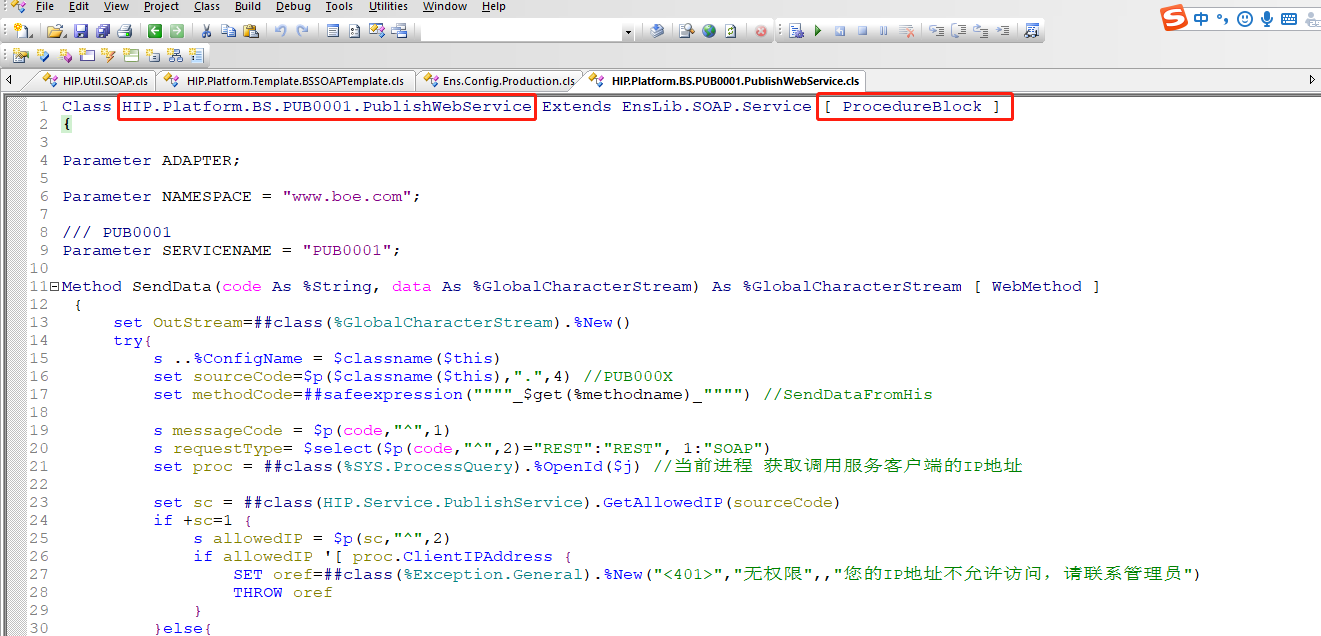 打开Portal管理界面,Production配置,可看到该服务已添加至Production中,如下:
 可直接通过soapUI调用,地址
http://localhost:57772/csp/hip/HIP.Platform.BS.PUB0001.PublishWebService.CLS?WSDL=1
可直接通过soapUI调用,地址
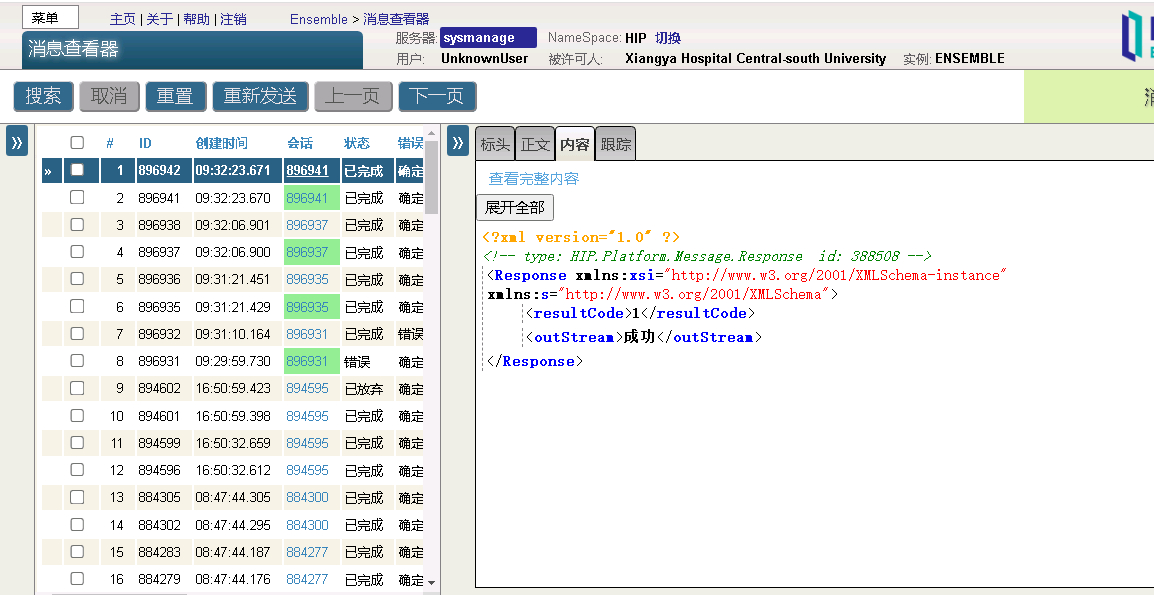
http://localhost:57772/csp/hip/HIP.Platform.BS.PUB0001.PublishWebService.CLS?WSDL=1 InterSystems消息查看

 ###五、 结论与猜想
同理,BO也可通过该方法实现自动生成,另可通过建立REST服务或WebService服务的方式通过前端调用该方法实现前端自动生成BS、BP、BO,以简化用户操作,但该方法存在问题点,如BP都为公用单个BP,消息并发量大时可能导致BP堵塞问题,可能实现的解决方法为前端先单独调用接口创建BP,后生成BS,再通过配置实现BS到BP的关联,大家感兴趣可自行尝试,以上,谢谢!
###五、 结论与猜想
同理,BO也可通过该方法实现自动生成,另可通过建立REST服务或WebService服务的方式通过前端调用该方法实现前端自动生成BS、BP、BO,以简化用户操作,但该方法存在问题点,如BP都为公用单个BP,消息并发量大时可能导致BP堵塞问题,可能实现的解决方法为前端先单独调用接口创建BP,后生成BS,再通过配置实现BS到BP的关联,大家感兴趣可自行尝试,以上,谢谢!

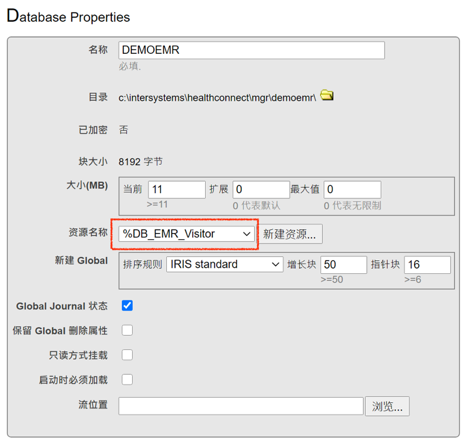
 在创建角色之后,即可为其分配资源。根据资源类型的不同,对资源的操作可以有读、写和使用三种权限。对于数据库引用的资源,是读权限和写权限。在本例中,我们需要创建的是只读用户,因此,资源权限分配读权限即可,不用赋写权限。

 在经过上述配置之后,用户DemoUser即已拥有对命名空间DEMOSPACE中数据库的访问权限。
 此时,用户对数据库拥有读权限,但并没有对表执行查询或建表的权限,如果尝试create table,则会得到如下的权限错误信息:
 为继续实验,我们通过Portal执行这SQL语句先创建DemoSchema.Persons这张表

 在SQL表,SQL视图和SQL过程栏中,则是分别对表、视图和存储过程授予查询、执行等权限。在本例中,用户需要对DemoSchema这个Schema下的表拥有select查询权限,即可通过对SQL表授权进行
 授权后该角色的SQL表权限如下
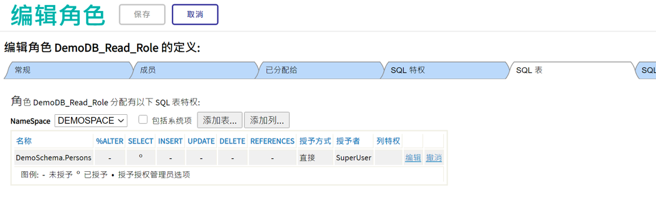 此时通过SQL工具已可执行查询
 使用Portal授权时是针对单个的表、视图或存储过程进行。在上例中,我们单独对表DemoSchema.Persons进行了授权,如果我们再建立一张DemoSchema.Employee表,当前的角色和用户并不能自动获得读取其数据的权限。
 即这个角色已经拥有了Schema级的授权,因此,对整个Schema下的所有表都拥有权限。之后在Schema中如果建立了新的表,则这个角色会自动拥有这些表的读权限。
 IRIS的Web应用程序在创建时默认并不需要额外的资源去访问,这意味着所有合法用户都能登入这个Web应用,但由于支撑应用的后台程序和数据是受到资源的保护的,能登入的用户不一定具有运行程序、访问数据的权限,正如我们建立的用户DemoUser可以登录Portal,但没有功能菜单可用。
如果需要进一步限制用户的行为,禁止其登录,则还需要对应用权限进行控制。
如我们在上一篇文章:
IRIS的Web应用程序在创建时默认并不需要额外的资源去访问,这意味着所有合法用户都能登入这个Web应用,但由于支撑应用的后台程序和数据是受到资源的保护的,能登入的用户不一定具有运行程序、访问数据的权限,正如我们建立的用户DemoUser可以登录Portal,但没有功能菜单可用。
如果需要进一步限制用户的行为,禁止其登录,则还需要对应用权限进行控制。
如我们在上一篇文章: 其中必要的资源一栏即为该应用的资源需求,默认为空,即访问该应用不需要特定资源,只要是合法用户即可。我们可以为该应用指定所需资源,例如%Development,即只有具有%Development资源的角色及其对应的用户才能够访问该程序。保存设置后,再尝试以用户DemoUser登录Portal,结果是
 除非我们为DemoUser引用的角色DemoDB_Read_Role分配资源%Development,该用户都不能登录。
当然,超级管理员由于拥有所有权限,不受这个设置的影响。
除非我们为DemoUser引用的角色DemoDB_Read_Role分配资源%Development,该用户都不能登录。
当然,超级管理员由于拥有所有权限,不受这个设置的影响。 图中红框标出的即为系统安装后会自动启用并需经认证才可使用的系统服务,认证手段可配置。
例如,如果变更%Service_Console的身份验证方法,取消密码方法,用户就不能通过输入用户名密码登入Terminal。
通过Portal的菜单 系统管理 > 安全 > 服务 可访问该设置。
图中红框标出的即为系统安装后会自动启用并需经认证才可使用的系统服务,认证手段可配置。
例如,如果变更%Service_Console的身份验证方法,取消密码方法,用户就不能通过输入用户名密码登入Terminal。
通过Portal的菜单 系统管理 > 安全 > 服务 可访问该设置。