##嵌入式 Python

0 关注者 · 42 帖子

嵌入式 Python 是指将 Python 编程语言集成到 InterSystems IRIS 内核中,允许开发者使用 Python 对数据进行操作并为服务器端应用程序开发业务逻辑。

文档

文章 姚 鑫 · 七月 15, 2022 5m read

第六章 使用嵌入式 Python (三)

从 ObjectScript 调用嵌入式 Python 代码

使用 Python 库

嵌入式 Python 让可以轻松访问数以千计的有用库。通常称为“包”,它们需要从 Python 包索引 (PyPI) 安装到 <installdir>/mgr/python 目录中,然后才能使用。

例如,ReportLab Toolkit 是一个用于生成 PDF 和图形的开源库。以下命令使用软件包安装程序 irispipWindows 系统上安装 ReportLab

C:\InterSystems\IRIS\bin>irispip install --target C:\InterSystems\IRIS\mgr\python reportlab

在基于 UNIX 的系统上,使用:

$ pip3 install --target /InterSystems/IRIS/mgr/python reportlab

安装包后,可以使用 %SYS.Python 类的 Import() 方法在 ObjectScript 代码中使用它。

给定一个文件位置,以下 ObjectScript 方法 CreateSamplePDF() 创建一个示例 PDF 文件并将其保存到该位置。

Class Demo.PDF
{

ClassMethod CreateSamplePDF(fileloc As %String) As %Status
{
    set canvaslib = ##class(%SYS.Python).Import("reportlab.pdfgen.canvas")
    set canvas = canvaslib.Canvas(fileloc)
    do canvas.drawImage("C:\Sample\isc.png", 150, 600)
    do canvas.drawImage("C:\Sample\python.png", 150, 200)
    do canvas.setFont("Helvetica-Bold", 24)
    do canvas.drawString(25, 450, "InterSystems IRIS & Python. Perfect Together.")
    do canvas.save()
}

}

该方法的第一行从 ReportLabpdfgen 子包中导入 canvas.py 文件。第二行代码实例化一个 Canvas 对象,然后继续调用它的方法,这与调用任何 IRIS 对象的方法很相似。

然后,可以以通常的方式调用该方法:

do ##class(Demo.PDF).CreateSamplePDF("C:\Sample\hello.pdf")

调用用 Python 编写的 IRIS 类的方法

可以使用嵌入式 PythonIRIS 类中编写方法,然后从 ObjectScript 调用它,就像调用用 ObjectScript 编写的方法一样。

下一个示例使用 usaddress-scourgify 库,可以从 Windows 上的命令行安装,如下所示:

C:\InterSystems\IRIS\bin>irispip install --target C:\InterSystems\IRIS\mgr\python usaddress-scourgify

在基于 UNIX 的系统上,使用:

$ pip3 install --target /InterSystems/IRIS/mgr/python usaddress-scourgify

下面的演示类包含美国地址部分的属性和一个用 Python 编写的方法,该方法使用 usaddress-scourgify 根据美国邮政服务标准对地址进行规范化。

Class Demo.Address Extends %Library.Persistent
{

Property AddressLine1 As %String;

Property AddressLine2 As %String;

Property City As %String;

Property State As %String;

Property PostalCode As %String;

Method Normalize(addr As %String) [ Language = python ]
{

    from scourgify import normalize_address_record
    normalized = normalize_address_record(addr)

    self.AddressLine1 = normalized['address_line_1']
    self.AddressLine2 = normalized['address_line_2']
    self.City = normalized['city']
    self.State = normalized['state']
    self.PostalCode = normalized['postal_code']
}

}

给定地址字符串作为输入,类的 Normalize() 实例方法规范化地址并将每个部分存储在 Demo.Address 对象的各种属性中。

可以按如下方式调用该方法:

USER>set a = ##class(Demo.Address).%New()
 
USER>do a.Normalize("One Memorial Drive, 8th Floor, Cambridge, Massachusetts 02142")
 
USER>zwrite a
a=3@Demo.Address  <OREF>
+----------------- general information ---------------
|      oref value: 3
|      class name: Demo.Address
| reference count: 2
+----------------- attribute values ------------------
|       %Concurrency = 1  <Set>
|       AddressLine1 = "ONE MEMORIAL DR"
|       AddressLine2 = "FL 8TH"
|               City = "CAMBRIDGE"
|         PostalCode = "02142"
|              State = "MA"
+-----------------------------------------------------

运行用 Python 编写的 SQL 函数或存储过程

当使用嵌入式 Python 创建 SQL 函数或存储过程时, IRIS 会投影一个具有可从 ObjectScript 调用的方法的类,就像使用任何其他方法一样。

例如,本文档前面示例中的 SQL 函数会生成一个类 User.functzconvert,它有一个 tzconvert() 方法。从 ObjectScript 调用它,如下所示:

USER>zwrite ##class(User.functzconvert).tzconvert($zdatetime($h,3),"US/Eastern","UTC")
"2021-10-20 15:09:26"

这里,$zdatetime($h,3) 用于将当前日期和时间从 $HOROLOG 格式转换为 ODBC 日期格式。

运行任意 Python 命令

有时,当开发或测试嵌入式 Python 代码时,从 ObjectScript 运行任意 Python 命令会很有帮助。可以使用 %SYS.Python 类的 Run() 方法来执行此操作。

也许想测试本文档前面使用的 usaddress_scourgify 包中的 normalize_address_record() 函数,但不记得它是如何工作的。可以使用 %SYS.Python.Run() 方法从终端输出函数的帮助,如下所示:

USER>set rslt = ##class(%SYS.Python).Run("from scourgify import normalize_address_record")
 
USER>set rslt = ##class(%SYS.Python).Run("help(normalize_address_record)")      
Help on function normalize_address_record in module scourgify.normalize:
normalize_address_record(address, addr_map=None, addtl_funcs=None, strict=True)
    Normalize an address according to USPS pub. 28 standards.
 
    Takes an address string, or a dict-like with standard address fields
    (address_line_1, address_line_2, city, state, postal_code), removes
    unacceptable special characters, extra spaces, predictable abnormal
    character sub-strings and phrases, abbreviates directional indicators
    and street types.  If applicable, line 2 address elements (ie: Apt, Unit)
    are separated from line 1 inputs.
.
.
.

%SYS.Python.Run() 方法在成功时返回 0,在失败时返回 -1

0
0 143
文章 姚 鑫 · 七月 14, 2022 3m read

第五章 使用嵌入式 Python (二)

在 Python 脚本文件 (.py) 中

还可以使用 irispython 命令执行 Python 脚本。

考虑 Windows 系统上的文件 C:\python\test.py,其中包含以下代码:

# print the members of the Fibonacci series that are less than 10
print('Fibonacci series:')
a, b = 0, 1
while a < 10:
    print(a, end=' ')
    a, b = b, a + b

# import the iris module and show the classes in this namespace
import iris
print('\nInterSystems IRIS classes in this namespace:')
status = iris.cls('%SYSTEM.OBJ').ShowClasses()
print(status)

可以从命令行运行 test.py,如下所示:

C:\InterSystems\IRIS\bin>set IRISUSERNAME = <username>

C:\InterSystems\IRIS\bin>set IRISPASSWORD = <password>

C:\InterSystems\IRIS\bin>set IRISNAMESPACE = USER

C:\InterSystems\IRIS\bin>irispython \python\test.py
Fibonacci series:
0 1 1 2 3 5 8
InterSystems IRIS classes in this namespace:
User.Company
User.Person
1

在基于 UNIX 的系统上,使用 export 而不是 set

/InterSystems/IRIS/bin$ export IRISUSERNAME=<username>
/InterSystems/IRIS/bin$ export IRISPASSWORD=<password>
/InterSystems/IRIS/bin$ export IRISNAMESPACE=USER
/InterSystems/IRIS/bin$ ./irispython /python/test.py
Fibonacci series:
0 1 1 2 3 5 8
InterSystems IRIS classes in this namespace:
User.Company
User.Person
1

注意:如果运行 import iris 并看到一条消息说 IRIS_ACCESSDENIED,请启用 %Service_Callin。在管理门户中,转至 System Administration > Security > Services,选择 %Service_CallIn,然后选中启用服务框。

在 IRIS 类的方法中

可以使用 Language 关键字在 IRIS 类中编写 Python 方法。然后,可以调用该方法,就像调用用 ObjectScript 编写的方法一样。

例如,使用 Python 编写的具有类方法的以下类:

Class User.EmbeddedPython
{

/// Description
ClassMethod Test() As %Status [ Language = python ]
{
    # print the members of the Fibonacci series that are less than 10
    print('Fibonacci series:')
    a, b = 0, 1
    while a < 10:
        print(a, end=' ')
        a, b = b, a + b

    # import the iris module and show the classes in this namespace
    import iris
    print('\nInterSystems IRIS classes in this namespace:')
    status = iris.cls('%SYSTEM.OBJ').ShowClasses()
    return status
}

}

可以从 ObjectScript 调用此方法:

USER>set status = ##class(User.EmbeddedPython).Test()
Fibonacci series:
0 1 1 2 3 5 8
InterSystems IRIS classes in this namespace:
User.Company
User.EmbeddedPython
User.Person

USER>write status
1

或来自 Python

>>> import iris
>>> status = iris.cls('User.EmbeddedPython').Test()
Fibonacci series:
0 1 1 2 3 5 8
InterSystems IRIS classes in this namespace:
User.Company
User.EmbeddedPython
User.Person
>>> print(status)
1

在 SQL 函数和存储过程中

还可以通过在 CREATE 语句中指定参数 LANGUAGE PYTHON 来使用 Embedded Python 编写 SQL 函数或存储过程,如下所示:

CREATE FUNCTION tzconvert(dt DATETIME, tzfrom VARCHAR, tzto VARCHAR)
    RETURNS DATETIME
    LANGUAGE PYTHON
{
    from datetime import datetime
    from dateutil import parser, tz
    d = parser.parse(dt)
    if (tzfrom is not None):
        tzf = tz.gettz(tzfrom)
        d = d.replace(tzinfo = tzf)
    return d.astimezone(tz.gettz(tzto)).strftime("%Y-%m-%d %H:%M:%S")
}

该代码使用 Python datetimedateutil 模块中的函数。

以下 SELECT 语句调用 SQL 函数,将当前日期/时间从东部时间转换为协调世界时 (UTC)。

SELECT tzconvert(now(), 'US/Eastern', 'UTC')

该函数返回如下内容:

2021-10-19 15:10:05
0
0 134
文章 姚 鑫 · 七月 12, 2022 6m read

第三章 嵌入式Python概述(三)

使用 SQL

IRIS 中的类被投影到 SQL,除了使用类方法或直接全局访问之外,还允许使用查询访问数据。 iris 模块为提供了两种从 Python 运行 SQL 语句的不同方式。

以下示例使用 iris.sql.exec() 运行 SQL SELECT 语句以查找类名称以“%Net.LDAP”开头的所有类定义,返回一个包含每个名称和超类的结果集每个班级。在这里,系统类 %Dictionary.ClassDefinitionSQL 投影为同名表。

>>> rs = iris.sql.exec("SELECT Name, Super FROM %Dictionary.ClassDefinition WHERE Name %STARTSWITH '%Net.LDAP'")

以下示例使用 iris.sql.prepare() 准备 SQL 查询对象,然后执行查询,将“%Net.LDAP”作为参数传入:

>>> stmt = iris.sql.prepare("SELECT Name, Super FROM %Dictionary.ClassDefinition WHERE Name %STARTSWITH ?")
>>> rs = stmt.execute("%Net.LDAP")

无论哪种情况,都可以按如下方式遍历结果集,并且输出相同:

>>> for idx, row in enumerate(rs):                                              
...     print(f"[{idx}]: {row}")                                                
...
[0]: ['%Net.LDAP.Client.EditEntry', '%RegisteredObject']
[1]: ['%Net.LDAP.Client.Entries', '%RegisteredObject,%Collection.AbstractIterator']
[2]: ['%Net.LDAP.Client.Entry', '%RegisteredObject,%Collection.AbstractIterator']
[3]: ['%Net.LDAP.Client.PropList', '%RegisteredObject']
[4]: ['%Net.LDAP.Client.Search.Scope', '%Integer']
[5]: ['%Net.LDAP.Client.Session', '%RegisteredObject']
[6]: ['%Net.LDAP.Client.StringList', '%RegisteredObject']
[7]: ['%Net.LDAP.Client.ValueList', '%RegisteredObject,%Collection.AbstractIterator']

使用Globals

IRIS 数据库中,所有数据都存储在全局变量中。全局数组是持久的(意味着它们存储在磁盘上)、多维的(意味着它们可以有任意数量的下标)和稀疏的(意味着下标不必是连续的)。当您在表中存储类的对象或行时,这些数据实际上存储在全局变量中,尽管您通常通过方法或 SQL 访问它们并且从不直接接触全局变量。

有时将持久数据存储在全局变量中会很有用,而无需设置类或 SQL 表。在 IRIS 中,全局变量看起来很像任何其他变量,但它在名称前用插入符号 (^) 表示。以下示例将工作日的名称存储在当前命名空间的全局 ^Workdays 中。

>>> myGref = iris.gref('^Workdays')
>>> myGref[None] = 5
>>> myGref[1] = 'Monday'
>>> myGref[2] = 'Tuesday'
>>> myGref[3] = 'Wednesday'
>>> myGref[4] = 'Thursday'
>>> myGref[5] = 'Friday'
>>> print(myGref[3])
Wednesday

第一行代码 mmyGref = iris.gref('^Workdays') 获取一个全局引用(或 gref),指向一个名为 ^Workdays 的全局引用,它可能已经存在也可能不存在。

第二行 myGref[None] = 5 将工作日数存储在 ^Workdays 中,不带下标。

第三行 myGref[1] = 'Monday' 将字符串 Monday 存储在位置 ^Workdays(1) 中。接下来的四行将剩余的工作日存储在位置 ^Workdays(2)^Workdays(5) 中。

最后一行 print(myGref[3]) 显示了如何在给定 gref 的情况下访问存储在全局中的值。

一起使用 ObjectScript 和 Python

IRISObjectScriptPython 程序员的混合团队轻松协作。例如,类中的一些方法可以用 ObjectScript 编写,而另一些可以用 Python 编写。程序员可以选择用他们最熟悉的语言编写,或者更适合手头任务的语言。

创建混合 InterSystems IRIS 类

下面的类有一个用 Python 编写的 Print() 方法和一个用 ObjectScript 编写的 Write() 方法,但它们在功能上是等效的,并且可以从 PythonObjectScript 调用这两种方法。

Class Sample.Company Extends (%Persistent, %Populate, %XML.Adaptor)
{

/// The company's name.
Property Name As %String(MAXLEN = 80, POPSPEC = "Company()") [ Required ];

/// The company's mission statement.
Property Mission As %String(MAXLEN = 200, POPSPEC = "Mission()");

/// The unique Tax ID number for the company.
Property TaxID As %String [ Required ];

/// The last reported revenue for the company.
Property Revenue As %Integer;

/// The Employee objects associated with this Company.
Relationship Employees As Employee [ Cardinality = many, Inverse = Company ];

Method Print() [ Language = python ]
{
    print ('\nName: ' + self.Name + ' TaxID: ' + self.TaxID)
}

Method Write() [ Language = objectscript ]
{
    write !, "Name: ", ..Name, " TaxID: ", ..TaxID
}
}

Python 代码示例展示了如何使用 %Id=2 打开 Company 对象并调用 Print()Write() 方法。

>>> company = iris.cls("Sample.Company")._OpenId(2)
>>> company.Print()
 
Name: IntraData Group Ltd. TaxID: G468
>>> company.Write()
 
Name: IntraData Group Ltd. TaxID: G468

ObjectScript 代码示例展示了如何打开相同的 Company 对象并调用这两种方法。

SAMPLES>set company = ##class(Sample.Company).%OpenId(2)
 
SAMPLES>do company.Print()
 
Name: IntraData Group Ltd. TaxID: G468
 
SAMPLES>do company.Write()
 
Name: IntraData Group Ltd. TaxID: G468

在 Python 和 ObjectScript 之间传递数据

虽然 PythonObjectScript 在许多方面都兼容,但它们有许多自己的数据类型和结构,有时在将数据从一种语言传递到另一种语言时需要进行一些数据转换。之前看到了一个示例,即从 ObjectScriptPython 传递命名参数的示例。

%SYS.Python 类的 Builtins() 方法为提供了一种方便的方式来访问 Python 的内置函数,它可以帮助创建 Python 方法所期望的类型的对象。

以下 ObjectScript 示例创建两个 Python 数组 newportcleveland,每个数组都包含一个城市的纬度和经度:

USER>set builtins = ##class(%SYS.Python).Builtins()
 
USER>set newport = builtins.list()
 
USER>do newport.append(41.49008)
 
USER>do newport.append(-71.312796)
 
USER>set cleveland = builtins.list()
 
USER>do cleveland.append(41.499498)
 
USER>do cleveland.append(-81.695391)

USER>zwrite newport
newport=11@%SYS.Python  ; [41.49008, -71.312796]  ; <OREF>

USER>zwrite cleveland
cleveland=11@%SYS.Python  ; [41.499498, -81.695391]  ; <OREF>

下面的代码使用在前面的示例中看到的 geopy 包来计算纽波特,罗德岛和克利夫兰,俄亥俄州之间的距离。它使用 geopy.distance.distance() 方法创建一条路线,将数组作为参数传递,然后打印路线的英里属性。

USER>set distance = $system.Python.Import("geopy.distance")
 
USER>set route = distance.distance(newport, cleveland)

USER>write route.miles
538.3904453677205311

注意: geopy.distance.distance() 方法实际上期望参数是 Python 元组数据类型,但数组也可以。

运行 Python 命令

当开发或测试某些东西时,有时运行一行 Python 代码以查看它的作用或是否有效可能会很有用。在这种情况下,可以使用 %SYS.Python.Run() 方法,如下例所示:

USER>set rslt = ##class(%SYS.Python).Run("print('hello world')")
hello world
1
0 133
文章 Lilian Huang · 七月 13, 2022 5m read

InterSystems Native SDK for Python InterSystems IRIS APIs 的轻量级接口,曾经只能通过 ObjectScript 使用。

准确地说,我对调用 ObjectScript 方法、类方法的能力特别感兴趣。它可以工作,而且效果很好,但默认情况下,调用只支持标量参数:字符串、布尔值、整数和浮点数。

但如果你想:

- 传递或返回结构,例如字典或列表

- 传递或返回流

您需要编写一些粘合代码或使用这个project (使用 pip install edpy 安装)。 edpy 包会给你一个简单的签名:

call(iris, class_name, method_name, args)

它允许您调用任何 ObjectScript 方法并返回结果。

像这样导入它:

from edpy import iris

call accepts 4 required arguments:
iris - a reference to an established IRIS object
class_name - IRIS class to call
method_name - IRIS method to call
args - list of 0 or more arguments

参数

每个参数可以是以下其中之一:

0
0 412
文章 Frank Ma · 六月 27, 2022 3m read

比较不同的商业智能技术是非常有趣的。我很好奇它们在功能、开发工具、速度和可用性方面有什么不同。

在这个应用程序中,我选择了一个有欧洲各国水状况的数据集。这是一个开源的数据集,包含1991年到2017年的观测数据。

团队和我决定使用IRIS BI、Tableau、PowerBI和InterSystems Reports(由Logi Reports驱动)在这个BI数据集的基础上制作一个模型

对于前端,我们通过Embedded Python在PythonFlask中制作了一个网页界面。

顺便说一下,其结果可以在这个网页上看到:http://atscale.teccod.com:8080/
你可以看看demo stand (演示台),因为从资源库部署一个容器可能需要多至20分钟的时间。大量的python包,后面会有更多的原因。

主页面

数据

事实上,数据似乎很小,期间只有17年 :)

因此,在现有的基础上,我想延续数据集,为此使用了一个神经网络。使用同样的嵌入式Python,使用了Tensorflow,这个包下载后占据了511MB,不要惊讶

实际上,这也是容器部署时间长的原因--为神经网络下载了很多包,相当多的相关包,安装时间很长。不过会有一篇关于神经网络和Integrated ML(一体化机器学习)的单独文章,我很快会发表。

0
0 144
文章 Michael Lei · 五月 3, 2022 6m read

Hi 社区,

想象一下,使您的应用程序能够阅读文本?现在有了IRIS的新功能--嵌入式Python,这就成为可能。有了这个新功能,IRIS可以原生地运行任何开源或商业的Python库。gTTS(https://pypi.org/project/gTTS/)是一个免费的库,使用谷歌翻译服务将文本转换成音频。

怎么做

只要通过参数传递文本,gTTS就会返回一个将文本转换为音频的MP3文件。也就是说,你的应用程序可以播放任何文本的音频! 请看如何做到这一点。

1. 进入https://openexchange.intersystems.com/package/IRIS-Text2Audio,点击下载按钮。

2. 克隆/git pull repo到任何本地目录中

$ git clone https://github.com/yurimarx/iris-tts.git

3. 在这个目录中打开一个Docker终端,运行:

$ docker-compose build

4. 运行IRIS container:

$ docker-compose up -d 

5. 到Postman (或其他类似的 REST 客户端) 来配置请求,如图所示:

0
0 198
文章 Michael Lei · 四月 12, 2022 7m read

程序化访问 Production

要用程序编辑Production(界面),你可以使用互操作性API和SQL查询的组合。

现有的命名空间

从顶层了解你目前正在工作的命名空间和生产是很重要的。

// Object script 
// The active namespace is stored in this variable
$$$NAMESPACE 
// Print namespace
Write $$$NAMESPACE
# Python
import iris
# The active namespace is returned from this method
iris.utils._OriginalNamespace()
# Print namespace
print(iris.utils._OriginalNamespace())
>>> DEMONSTRATION

现有Production (正在或者最后一次运行的Production)

另外,知道你的Production名称是很重要的,你可以使用以下API获得名称空间中正在运行的Production。

// ObjectScript
USER>ZN "DEMONSTRATION"
// Get current or last run production
DEMONSTRATION>W ##class(Ens.Director).GetActiveProductionName()
>>> Hospital.HospitalProduction
#  Python
import os
os.environ['IRISNAMESPACE'] = 'DEMONSTRATION'
import iris
active_production = iris.cls('Ens.Director').GetActiveProductionName()
print(active_production)
>>> Hospital.HospitalProduction

在production中寻找项目

你可以使用Objectscript或python来寻找Production中在运行的项目

1. SQL 查询 Production中的项目

SELECT Name FROM Ens_Config.Item Where Production = 'Hospital.HospitalProduction'
-- 
['From_Athena_Multi']
['From_Athena_Multi_Router']
['From_Cerner_ADT']
['From_Cerner_ADT_Router']
['From_Cerner_Orders']
['From_Cerner_Orders_Router']
['From_Dictaphone_Results']
['From_Dictaphone_Results_Router']
['From_Lab_Results']
['From_Lab_Results_Router']
['From_Radiology_Results']
['From_Radiology_Results_Router']
['HS.IHE.XDSb.DocumentSource.Operations']
['HS.IHE.XDSb.Repository.Operations']
['To_Cerner_Results']
['To_Dictaphone']
['To_Intellilab']
['To_Lab']
['To_Radiology']
-- 

2. SQL 查询Production中正在运行的项目

SELECT Name, ClassName 
FROM Ens_Config.Item 
WHERE Production = 'Hospital.HospitalProduction' 
  AND Enabled = 1

-- 
Name	                                ClassName
To_Radiology	                        EnsLib.HL7.Operation.FileOperation
To_Lab	                                EnsLib.HL7.Operation.FileOperation
To_Dictaphone	                        EnsLib.HL7.Operation.FileOperation
From_Cerner_ADT	                        EnsLib.HL7.Service.FileService
From_Cerner_ADT_Router	                EnsLib.HL7.MsgRouter.RoutingEngine
From_Radiology_Results_Router	        EnsLib.HL7.MsgRouter.RoutingEngine
From_Lab_Results_Router	                EnsLib.HL7.MsgRouter.RoutingEngine
From_Dictaphone_Results_Router	        EnsLib.HL7.MsgRouter.RoutingEngine
To_Intellilab	                        EnsLib.HL7.Operation.FileOperation
To_Cerner_Results	                    EnsLib.HL7.Operation.FileOperation
From_Cerner_Orders_Router	            EnsLib.HL7.MsgRouter.RoutingEngine
From_Athena_Multi_Router	            EnsLib.HL7.MsgRouter.RoutingEngine
HS.IHE.XDSb.DocumentSource.Operations	HS.IHE.XDSb.DocumentSource.Operations
-- 

3. 对象访问 Production 项目

// ObjectScript 
// Access to get all items in the active production
// Returns list of items
ClassMethod ListItemsInProduction()
{
    Set productionName =  ##class(Ens.Director).GetActiveProductionName()
    Set items = []
    &sql(Declare curr cursor FOR Select Name into :newId from Ens_Config.Item Where Production = :productionName)
    &sql(OPEN curr)
    For {
        &sql(FETCH curr)
        Quit:SQLCODE
        Do items.%Push(newId)
    }
    &sql(CLOSE curr)
    quit items
}

>>> zw ##class(ISC.SE.ProductionTools).ListItemsInProduction()

["From_Athena_Multi","From_Athena_Multi_Router","From_Cerner_ADT","From_Cerner_ADT_Router","From_Cerner_Orders","From_Cerner_Orders_Router","From_Dictaphone_Results","From_Dictaphone_Results_Router"
,"From_Lab_Results","From_Lab_Results_Router","From_Radiology_Results","From_Radiology_Results_Router","HS.IHE.XDSb.DocumentSource.Operations","HS.IHE.XDSb.Repository.Operations","To_Cerner_Results"
,"To_Dictaphone","To_Intellilab","To_Lab","To_Radiology"]  ; <DYNAMIC ARRAY>
# Python
# Get Dataframe of active production items

import os
# Set environment variables
os.environ['IRISNAMESPACE'] = 'DEMONSTRATION'
import iris

def getActiveProductionItems():
    productionName = iris.cls('Ens.Director').GetActiveProductionName()
    df = iris.sql.exec("SELECT Name FROM Ens_Config.Item Where Production = '{}'".format(productionName))
    return df

production_items_df = getActiveProductionItems().dataframe()

#                                      name
# 0                       From_Athena_Multi
# 1                From_Athena_Multi_Router
# 2                         From_Cerner_ADT
# 3                  From_Cerner_ADT_Router
# 4                      From_Cerner_Orders
# 5               From_Cerner_Orders_Router
# 6                 From_Dictaphone_Results
# 7          From_Dictaphone_Results_Router
# 8                        From_Lab_Results
# 9                 From_Lab_Results_Router
# 10                 From_Radiology_Results
# 11          From_Radiology_Results_Router
# 12  HS.IHE.XDSb.DocumentSource.Operations
# 13      HS.IHE.XDSb.Repository.Operations
# 14                      To_Cerner_Results
# 15                          To_Dictaphone
# 16                          To_Intellilab
# 17                                 To_Lab
# 18                           To_Radiology

通过 API操作Production

1. 增加组件

// ObjectScript
set productionName = ##class(Ens.Director).GetActiveProductionName()
//create a new xml file service
set classname="EnsLib.XML.FileService"	//class of this item
set name="NewService"			//config name
set item=##class(Ens.Config.Item).%New(classname)

set item.Name=name
set item.Comment = "Test Service"
set item.PoolSize = "1"
set item.Enabled = 1
do item.%Save()
//	
// open the production class
// set prod="Test.configtest"	//production name set manually
// OR
set prod = productionName
set prodObj=##class(Ens.Config.Production).%OpenId(prod)
//save the new item
set tSC=prodObj.Items.Insert(item)
set tSC=prodObj.SaveToClass(item)
set tSC=prodObj.%Save()

// DELETE item from above
set tSC = prodObj.RemoveItem(item)
set tSC = prodObj.SaveToClass()
set tSC=prodObj.%Save()
# Python
import os
os.environ['IRISNAMESPACE'] = 'DEMONSTRATION'
import iris
active_production = iris.cls('Ens.Director').GetActiveProductionName()
print("Current Production {}".format(active_production))

# Metadata about component
classname="EnsLib.XML.FileService"	 # class of this item
name="NewService"			         # config name
item=iris.cls('Ens.Config.Item')._New(classname) # Make new component
item.Name=name
item.Comment = "Test Service"
item.PoolSize = "1"
item.Enabled = 1
item._Save()

# open the production class
# prod="Test.configtest"	# production name manually set
# OR use the active production from above
prod = active_production

prodObj=iris.cls('Ens.Config.Production')._OpenId(prod)
# save the production after we insert that item to it
tSC=prodObj.Items.Insert(item)
tSC=prodObj.SaveToClass(item)
tSC=prodObj._Save()

# DELETE item from above
tSC = prodObj.RemoveItem(item)
tSC = prodObj.SaveToClass()
tSC=prodObj._Save()

2. 激活 / 关闭 组件

// ObjectScript
set productionName = ##class(Ens.Director).GetActiveProductionName()
set itemName = "My.Inbound.HL7"
// Required for Enable Item
Set componentName = productionName _ "||" _ itemName _ "|"
// Disable or enable
Set enable = 1 // or 0
Do ##class(Ens.Director).EnableConfigItem(componentName, enable, 1)

/// Enable or disable a ConfigItem in a Production. The Production may be running or not.
/// The pConfigItemName argument gives the name of the config item to be enabled or disabled
/// In the case of multiple matching items with the same config name, if any is already enabled then
///  the pEnable=1 option will do nothing and the pEnable=0 option will disable the running matching
///   production item, or if not running then the first matching enabled item that it finds.
///   
/// See method Ens.Director.ParseConfigName() for full syntax of the ConfigItem name specification string.
ClassMethod EnableConfigItem(pConfigItemName As %String, pEnable As %Boolean = 1, pDoUpdate As %Boolean = 1)
# Python
import os
os.environ['IRISNAMESPACE'] = 'DEMONSTRATION'
import iris

active_production = iris.cls('Ens.Director').GetActiveProductionName()
item_name = "My.Inbound.HL7"
componentName = active_production + "||" + item_name + "|"

enable = 1 # or 0
iris.cls('Ens.Director').EnableConfigItem(componentName, enable, 1)

通过API获得Production状态

// ObjectScript
/// This method returns the production status via the output parameters.
/// pProductionName: Returns the production name when the status is running, suspended or troubled.
/// pState: Outputs production status. The valid values are:
///          $$$eProductionStateRunning == 1
///          $$$eProductionStateStopped == 2
///          $$$eProductionStateSuspended == 3
///          $$$eProductionStateTroubled == 4
Set sc = ##class(Ens.Director).GetProductionStatus(.productionName, .productionState) 
Write productionName, " -- ", productionState
import os
# Set namespace the hard way
os.environ['IRISNAMESPACE'] = 'DEMONSTRATION'

import iris

# TEST 2 with output variables
productionName, productionState = iris.ref('productionName'), iris.ref('productionState')
status = iris.cls('Ens.Director').GetProductionStatus(productionName, productionState) 

print("Status: {}".format(status))
# see .value
print("Production: {}".format(productionName.value))
# see .value
print("Production State: {}".format(productionState.value))
0
0 341
文章 Frank Ma · 三月 2, 2022 2m read

如果你的嵌入式Python代码调用了 tkinter library库(它被很多图形制作库使用,包括matplotlib),你可能会得到这个错误:

<THROW> *%Exception.PythonException <CLASS DOES NOT EXIST> 230 ^^0^DO ##CLASS(User.Test).Test() 
<class '_tkinter.TclError'>: Can't find a usable init.tcl in the following directories:

c:/intersystems/irispy/lib/python/lib/tcl8.6
c:/intersystems/irispy/lib/tcl8.6
c:/intersystems/lib/tcl8.6
c:/intersystems/irispy/library
c:/intersystems/library
c:/intersystems/tcl8.6.9/library
c:/tcl8.6.9/library

This probably means that Tcl wasn't installed properly.

下面是一个触发这个错误的代码样本:

0
0 1175
文章 Frank Ma · 三月 2, 2022 2m read

我们很高兴与你分享有趣的信息,以及告诉你为什么Python是好的,它被用在哪里。

其中使用最多的库是NumPy和Pandas。NumPy(Numerical Python)用来对大型数据集进行分类。它简化了数组上的数学运算及其矢量化。Pandas提供两种数据结构:系列Series(一个元素列表)和数据框架DataFrames(一个有多列的表格)。这个库将数据转换为数据框架,允许你删除和添加新的列,以及执行各种操作。

Python为数据分析项目提供了无数的工具,可以帮助完成任何任务。

0
0 341
文章 Jingwei Wang · 二月 14, 2022 7m read

1. 互操作性-嵌入式Python(interoperability-embedded-python)

这个概念旨在展示iris互操作性框架如何与嵌入的python一起使用。

1.2. 示例代码

import grongier.pex
import iris
import MyResponse

class MyBusinessOperation(grongier.pex.BusinessOperation):

    def OnInit(self):
        print("[Python] ...MyBusinessOperation:OnInit() is called")
        self.LOGINFO("Operation OnInit")
        return

    def OnTeardown(self):
        print("[Python] ...MyBusinessOperation:OnTeardown() is called")
        return

    def OnMessage(self, messageInput):
        if hasattr(messageInput,"_IsA"):
            if messageInput._IsA("Ens.StringRequest"):
                self.LOGINFO(f"[Python] ...This iris class is a Ens.StringRequest with this message {messageInput.StringValue}")
        self.LOGINFO("Operation OnMessage")
        response = MyResponse.MyResponse("...MyBusinessOperation:OnMessage() echos")
        return response

1.3. 注册一个组件

不需要 ObjectScript 代码.

多亏Grongier.PEX.Utils.RegisterComponent()方法。

启动一个嵌入式的Python shell:

/usr/irissys/bin/irispython

然后使用这个类方法将一个新的py文件添加到组件列表中,以实现互操作性。

iris.cls("Grongier.PEX.Utils").RegisterComponent(<ModuleName>,<ClassName>,<PathToPyFile>,<OverWrite>,<NameOfTheComponent>)

例如 :

iris.cls("Grongier.PEX.Utils").RegisterComponent("MyCombinedBusinessOperation","MyCombinedBusinessOperation","/irisdev/app/src/python/demo/",1,"PEX.MyCombinedBusinessOperation")

2. 演示

Production有四个Python组件:

  • 两个业务服务组件 :
    • 用Grongier.PEX.MyCombinedBusinessService持续的给业务操作组件发送同步消息
      • 这些消息是JSON格式的Python对象,存储于Grongier.PEX.Message类
      • Thoses messages are python objects casted in JSON and stored in Grongier.PEX.Message.
      • Python代码 : src/python/demo/MyCombinedBusinessService.py
    • Grongier.PEX.MyBusinessService是一个用于写消息日志的原始业务服务组件,无其他作用。
      • Python 代码 : src/python/demo/MyBusinessService.py
  • 两个业务操作组件:
    • Grongier.PEX.BusinessOperation是用于接收业务服务组件Grongier.PEX.MyCombinedBusinessService的消息
      • Python 代码 : src/python/demo/MyBusinessOperation.py
    • Grongier.PEX.CombinedBusinessOperation可以接收Ens.StringRequest消息,并返回Ens.StringResponse消息
      • Python 代码 : src/python/demo/MyCombinedBusinessOperation.py

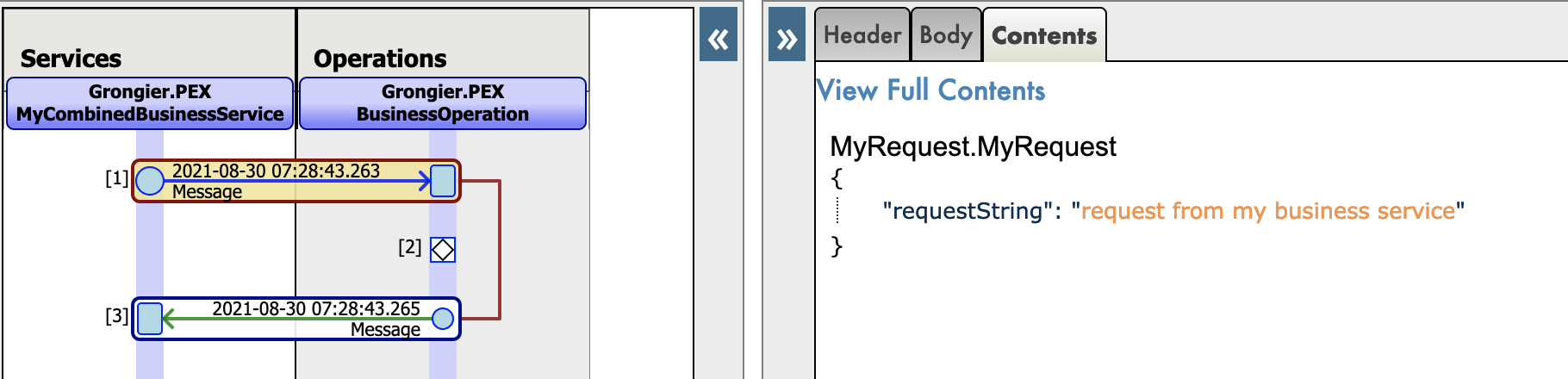
为Python本地消息新增json跟踪:

3. 前置需求

Git和Docker必须已安装

4. 使用Docker安装

从git拉取repo到本地

git clone https://github.com/grongierisc/interpeorability-embedded-python

在安装路径打开terminal,并运行:

docker-compose build

使用IRIS容器运行你的项目:

docker-compose up -d

5. 无Docker安装

在iris 实例上安装 grongier_pex-1.0.0-py3-none-any.whl :

/usr/irissys/bin/irispython -m pip install grongier_pex-1.0.0-py3-none-any.whl

然后,加载ObjectScript类:

do $System.OBJ.LoadDir("/opt/irisapp/src","cubk","*.cls",1)

6. 运行How to Run the Sample

打开production,并运行。

示例代码会开始运行。

7. repo中包含什么内容What's inside the repository

7.1. Dockerfile

Dockerfile包含在容器中安装一些python的依赖项,例如pip, venv和sudo 然后创建dev目录将git仓库复制进入目录

Dockerfile启动IRIS并导入Titanics csv文件,然后为Python Shell激活**%Service_CallIn**。 可以使用使用相关的docker-compose.yml来轻松地设置额外的参数,如端口号和映射键和主机文件夹的位置。

这个dockerfile以安装python模块的需求结束。

最后一部分是关于安装jupyter notebook和它的内核。

使用.env/文件来调整在docker-compose中使用的dockerfile。

7.2. .vscode/settings.json

VSCode配置文件 VSCode ObjectScript plugin

7.3. .vscode/launch.json

VSCode ObjectScript 调试配置文件

获取更多相关信息

7.4. .vscode/extensions.json

如果你想在容器中用VSCode运行,可以添加扩展。

获取更多相关信息

对于使用嵌入式python非常有用。

7.5. src 文件夹

src
├── Grongier
│   └── PEX // ObjectScript classes that wrap python code
│       ├── BusinessOperation.cls
│       ├── BusinessProcess.cls
│       ├── BusinessService.cls
│       ├── Common.cls
│       ├── Director.cls
│       ├── InboundAdapter.cls
│       ├── Message.cls
│       ├── OutboundAdapter.cls
│       ├── Python.cls
│       ├── Test.cls
│       └── Utils.cls
├── PEX // Some example of wrapped classes
│   ├── MyBusinessOperationWithAdapter.cls
│   ├── MyBusinessOperationWithIrisAdapter.cls
│   ├── MyBusinessOperationWithPythonAdapter.cls
│   ├── MyBusinessService.cls
│   ├── MyOutboundAdapter.cls
│   └── Production.cls
└── python
    ├── demo // Actual python code to run this demo
    │   ├── MyBusinessOperation.py
    │   ├── MyBusinessOperationWithAdapter.py
    │   ├── MyBusinessOperationWithIrisAdapter.py
    │   ├── MyBusinessProcess.py
    │   ├── MyBusinessService.py
    │   ├── MyCombinedBusinessOperation.py
    │   ├── MyCombinedBusinessProcess.py
    │   ├── MyCombinedBusinessService.py
    │   ├── MyInboundAdapter.py
    │   ├── MyLoggingOperation.py
    │   ├── MyNonPollingStarter.py
    │   ├── MyOutboundAdapter.py
    │   ├── MyRequest.py
    │   ├── MyResponse.py
    │   ├── MySyncBusinessProcess.py
    │   └── SimpleObject.py
    ├── dist // Wheel used to implement python interoperability components
    │   └── grongier_pex-1.0.0-py3-none-any.whl
    ├── grongier
    │   └── pex // Helper classes to implement interoperability components
    │       ├── _BusinessHost.py
    │       ├── _BusinessOperation.py
    │       ├── _BusinessProcess.py
    │       ├── _BusinessService.py
    │       ├── _Common.py
    │       ├── _Director.py
    │       ├── _InboundAdapter.py
    │       ├── _Message.py
    │       ├── _OutboundAdapter.py
    │       └── __init__.py
    └── setup.py // setup to build the wheel

8. 如何增加一个新组件

8.1. 入站适配器InboundAdapter

使用python执行入站适配器,使用grongier.pex.InboundAdapter子类,覆盖OnTask()方法。

8.2. 出站适配器OutboundAdapter

使用python执行出站适配器,使用grongier.pex.OutboundAdapter子类,实现所需action方法。

8.3. 业务服务组件BusinessService

使用python执行业务服务组件,使用grongier.pex.BusinessService子类,覆盖OnProcessInput()方法。

8.4. 业务流程组件BusinessProcess

使用python执行业务流程组件,使用grongier.pex.BusinessProcess子类,覆盖 OnRequest(), OnResponse() and OnComplete()方法。

8.5. 业务操作BusinessOperation

使用python执行业务流程组件,使用grongier.pex.BusinessOperation子类,覆盖 OnMessage()方法。

8.6. 注册一个组件

启动一个嵌入式python shell:

/usr/irissys/bin/irispython

然后使用这个类方法将一个新的py文件添加到组件列表中,以实现互操作性。

iris.cls("Grongier.PEX.Utils").RegisterComponent(<ModuleName>,<ClassName>,<PathToPyFile>,<OverWrite>,<NameOfTheComponent>)

例如 :

iris.cls("Grongier.PEX.Utils").RegisterComponent("MyCombinedBusinessOperation","MyCombinedBusinessOperation","/irisdev/app/src/python/demo/",1,"PEX.MyCombinedBusinessOperation")

8.7. 直接使用Grongier.PEX

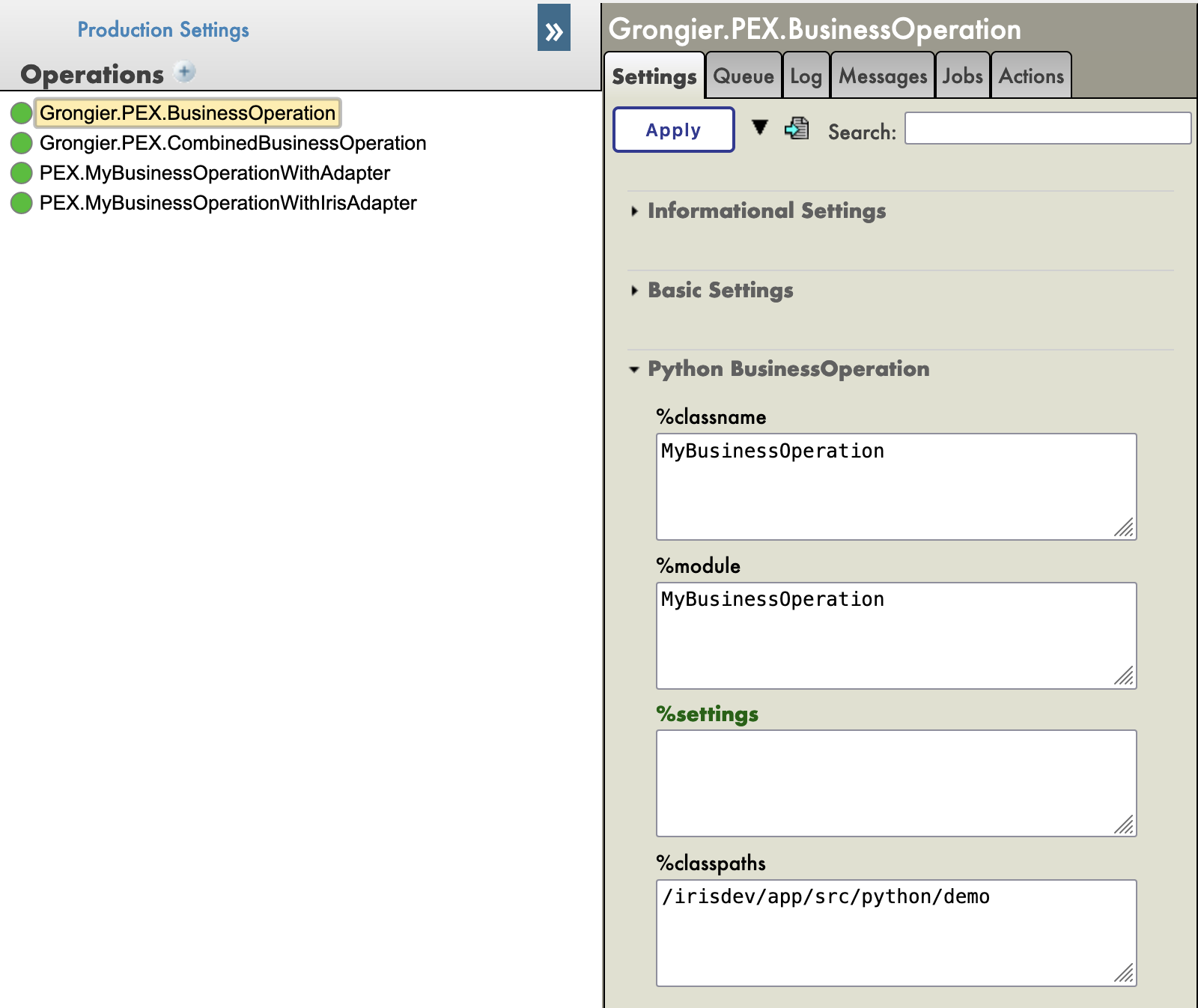
如果你不想使用RegisterComponent,你可以添加一个Grongier.PEX.Business*组件并配置其属性

  • %module :
    • 你的python代码的模块名称
  • %classname :
    • 你的组件的类名
  • %classpaths
    • 你的组件所在的路径。
    • 除了PYTHON_PATH之外,可以有一个或多个Classpaths(用'|'字符分隔)

例如 :

9. 其他工作

  • 仅业务服务组件和业务操作组件可以被测试
  • 在适配器上工作

10. 认证

大部分代码来自Mo Cheng和Summer Gerry的PEX for Python。

注册部分来自于尚未发布的IRIS 2021.3的功能。

0
0 194