概述
现有Ensemble平台BS(服务)、BP(流程)、BO(操作)需对平台及开发语言有一定的了解才能实现,为简化用户操作,现对现有平台进行二次封装,通过API接口的形式进行前后端分离,通过前端界面操作实现BS(对外提供的服务)、BP、BO(逻辑处理或调用外部的服务)自动生成(通过%Dictionary实现),具体实现如下。
一、开发技术和工具
版本:Ensemble 2017.2.1
二、涉及公用类
2.1 %Dictionary.ClassDefinition(自定义类)
• property Super as %CacheString; Specifies one or more superclasses for the class. 定义一个或多个父类,继承父类
• property** ProcedureBlock** as %Boolean [ InitialExpression = 0 ]; Specifies that the class uses procedure block for method code. 设置类是否允许使用程序块,程序块强制实施变量作用域:方法无法看到由其调用方定义的变量,程序块中的任何变量都会自动成为私有变量
• relationship Parameters as %Dictionary.ParameterDefinition [ Inverse = parent,Cardinality = children ]; Parameter. 定义类参数,如全局变量、适配器等相关定义
• relationship Methods as %Dictionary.MethodDefinition [ Inverse = parent,Cardinality = children ]; Method. 定义类方法
参考链接:http://localhost:57772/csp/documatic/%25CSP.Documatic.cls?APP=1&LIBRARY=%25SYS&CLASSNAME=%25Dictionary.ClassDefinition
2.2 %Dictionary.ParameterDefinition(自定义类参数)
• property Name as %Dictionary.CacheIdentifier [ Required ]; The name of the parameter. 定义参数名
• property Default as %CacheString [ SqlFieldName = _Default ]; Specifies a default value for the parameter assuming the Expression keyword is blank. 定义参数默认值,不设置则为空
• property Description as %CacheString; Specifies a description of the parameter. 定义参数描述
参考链接:http://localhost:57772/csp/documatic/%25CSP.Documatic.cls?APP=1&LIBRARY=%25SYS&CLASSNAME=%25Dictionary.ParameterDefinition
###2.3 %Dictionary.MethodDefinition(自定义类方法) • property Name as %Dictionary.CacheIdentifier [ Required ]; The name of the method. 定义方法名
• property ClassMethod as %Boolean [ InitialExpression = 0 ]; Specifies that the method is a class method. Instance methods can only be invoked via an instantiated object while class methods can be directly invoked without an object instance. 指定该方法是类方法。实例方法只能通过实例化的对象调用,而类方法可以在没有对象实例的情况下直接调用。
• property FormalSpec as %CacheString;
Specifies the list of arguments. Each argument is of the format [&|*]
• property ReturnType as %Dictionary.CacheClassname; Specifies the data type of the value returned by a call to the method. Setting ReturnType to an empty string specifies that there is no return value. 定义方法返回值,设置为空则无返回值
• property WebMethod as %Boolean [ InitialExpression = 0 ]; Specifies that a method can be invoked as a web method using the SOAP protocol. 设置方法是否为web方法,适用于SOAP协议
• property Implementation as %Stream.TmpCharacter; The code that is executed when the method is invoked. In the case of an expression method, this is an expression. In the case of a call method, this is the name of a Cache routine to call. 调用方法时执行的代码。对于表达式方法,这是一个表达式。对于调用方法,这是要调用的缓存例程的名称
参考链接:http://localhost:57772/csp/documatic/%25CSP.Documatic.cls?APP=1&LIBRARY=%25SYS&CLASSNAME=%25Dictionary.MethodDefinition
###2.4 Ens.Config.Production • property Items as list of Ens.Config.Item(XMLNAME="Item",XMLPROJECTION="ELEMENT"); 定义Production下的BS、BP、BO,根据父类确认属于哪一类
• method SaveToClass(pItem As Ens.Config.Item = $$$NULLOREF) as %Status This method saves the production into the XData of the corresponding class
###2.5 Ens.Config.Item(BS服务、BP流程、BO操作) • property PoolSize as %Integer(MINVAL=0,XMLPROJECTION="ATTRIBUTE"); Number of jobs to start for this config item. Default value: 0 for Business Processes (i.e. use shared Actor Pool) 1 for FIFO message router Business Processes (i.e. use a dedicated job) 1 for Business Operations 0 for adapterless Business Services 1 for others For TCP based Services with JobPerConnection=1, this value is used to limit the number of connection jobs if its value is greater than 1. A value of 0 or 1 places no limit on the number of connection jobs. 设置缓冲池大小
• property Name as %String(MAXLEN=128,XMLPROJECTION="ATTRIBUTE") [ Required ]; The name of this config item. Default is the class name. 设置BS、BP、BO名称
• property ClassName as %String(MAXLEN=128,XMLPROJECTION="ATTRIBUTE") [ Required ]; Class name of this config item. 设置BS、BP、BO类名称
• property Category as %String(MAXLEN=2500,XMLPROJECTION="ATTRIBUTE"); Optional list of categories this item belongs to, comma-separated. This is only used for display purposes and does not affect the behavior of this item. 设置类别 • property Comment as %String(MAXLEN=512,XMLPROJECTION="ATTRIBUTE"); Optional comment text for this component. 设置注释
• property Enabled as %Boolean(XMLPROJECTION="ATTRIBUTE") [ InitialExpression = 1 ]; Whether this config item is enabled or not. 设置启用停用标志
参考链接:http://localhost:57772/csp/documatic/%25CSP.Documatic.cls?PAGE=CLASS&LIBRARY=ENSLIB&CLASSNAME=Ens.Config.Item ##三、实现方法 ###3.1 创建BS模板类 创建模板类,后续类生成方法体通过模板类获取
/// BS的SOAP模板
Class HIP.Platform.Template.BSSOAPTemplate Extends EnsLib.SOAP.Service
{

Parameter ADAPTER;

Parameter NAMESPACE = "http://tempuri.org";

Parameter SERVICENAME = "BSSOAPTemplate";

Method TemplateFun(code As %String, data As %GlobalCharacterStream) As %GlobalCharacterStream [ WebMethod ]
{
	set OutStream=##class(%GlobalCharacterStream).%New()
	try{
		s ..%ConfigName = $classname($this)
		set sourceCode=$p($classname($this),".",4) //PUB000X
		set methodCode=##safeexpression(""""_$get(%methodname)_"""") //SendDataFromHis

		s messageCode = $p(code,"^",1)
		s requestType= $select($p(code,"^",2)="REST":"REST", 1:"SOAP")
		set proc = ##class(%SYS.ProcessQuery).%OpenId($j) //当前进程 获取调用服务客户端的IP地址

		set sc = ##class(HIP.Service.PublishService).GetAllowedIP(sourceCode)
		if +sc=1 {
			s allowedIP = $p(sc,"^",2)
			if allowedIP '[ proc.ClientIPAddress {
				SET oref=##class(%Exception.General).%New("<401>","无权限",,"您的IP地址不允许访问,请联系管理员")
         		THROW oref
			}
		}else{
			return sc
		}
		s request = ##class(HIP.Platform.Message.Request).%New()
		s request.sourceCode=sourceCode		//PUB0001
		s request.requestType=requestType	//REST SOAP
		s request.inputFlag="0"				//-1表示失败,0表示未处理,1表示成功
		s request.inputStream = data		//JSON流,或者XML流
		s request.messageCode=messageCode	//BOE0001

		Set tSC=..SendRequestSync("HIP.Platform.BP.ProcessCode",request,.pOutput)
		If $$$ISERR(tSC) Do ..ReturnMethodStatusFault(tSC)

		d OutStream.CopyFrom(pOutput.outStream)
		return OutStream
	}catch err {
		set OutStream=##class(%GlobalCharacterStream).%New()
		do OutStream.Write(err.DisplayString())
		return OutStream
	}
}

Storage Default
{
<Data name="BSSOAPTemplateDefaultData">
<Value name="1">
<Value>%%CLASSNAME</Value>
</Value>
</Data>
<DataLocation>^HIP.PlatforE240.BSSOAPTemplateD</DataLocation>
<DefaultData>BSSOAPTemplateDefaultData</DefaultData>
<IdLocation>^HIP.PlatforE240.BSSOAPTemplateD</IdLocation>
<IndexLocation>^HIP.PlatforE240.BSSOAPTemplateI</IndexLocation>
<StreamLocation>^HIP.PlatforE240.BSSOAPTemplateS</StreamLocation>
<Type>%Library.CacheStorage</Type>
}

}
###3.2 自动生成BS,并添加至Production中 通过模板类自动生成WebService方法,并添加到Production的BS中
/// 创建BS服务 PUB00XX服务,提供给第三方调用
/// d ##class(HIP.Util.SOAP).BSCreateSOAPInfo("PUB0001","提供给HIS访问平台")
ClassMethod BSCreateSOAPInfo(Code As %String, Desc As %String) As %Status
{
	///HIP.Platform.BS.PUB0001
	s src = "HIP.Platform.BS."_Code_".PublishWebService"
	s isExist = 0
	try {

		set isExist=##class(%Dictionary.ClassDefinition).%ExistsId(src)
		if isExist=1 { //类已存在则更新,先删除再插入
			set classObj = ##class(%Dictionary.ClassDefinition).%OpenId(src)
			d classObj.Parameters.Clear()
			d classObj.Properties.Clear()
			d classObj.Indices.Clear()
			d classObj.ForeignKeys.Clear()
			d classObj.Methods.Clear()
		}else { //类不存在则新建
			set classObj = ##class(%Dictionary.ClassDefinition).%New(src)
		}
		//设置父类
		s classObj.Super="EnsLib.SOAP.Service"
		//设置允许使用程序块,则可动态定义变量
		s classObj.ProcedureBlock=1

		///Parameter的值
		//设置适配器
		set ParDef = ##class(%Dictionary.ParameterDefinition).%New()
		set ParDef.Name="ADAPTER"
		d classObj.Parameters.Insert(ParDef)
		set ParDef = ##class(%Dictionary.ParameterDefinition).%New()
		//设置服务名
		set ParDef.Name="SERVICENAME"
		set ParDef.Default=Code
		set ParDef.Description=Desc
		d classObj.Parameters.Insert(ParDef)
		//设置命名空间
		set ParDef = ##class(%Dictionary.ParameterDefinition).%New()
		set ParDef.Name="NAMESPACE"
		set ParDef.Default="www.boe.com"
		d classObj.Parameters.Insert(ParDef)

		///函数模板代码,通过模板类获取
		s methodTemplate = ##class(%Dictionary.MethodDefinition).%OpenId("HIP.Platform.Template.BSSOAPTemplate||TemplateFun")
		Set methodObj=##class(%Dictionary.MethodDefinition).%OpenId(src_"||SendData")
		if methodObj="" Set methodObj=##class(%Dictionary.MethodDefinition).%New(src_".SendData")
		//设置方法名
		set methodObj.Name="SendData"
		set methodObj.ClassMethod=0
		//set methodObj.FormalSpec="code:%String,data:%GlobalCharacterStream,*pOutput:HIP.Platform.Message.Response"
		//设置方法入参
		set methodObj.FormalSpec="code:%String,data:%GlobalCharacterStream"
		//设置方法返回值
		set methodObj.ReturnType="%GlobalCharacterStream"
		//设置方法为WebService方法
		set methodObj.WebMethod=1
		//设置方法具体实现代码,通过模板类获取
		set methodObj.Implementation=methodTemplate.Implementation
		d classObj.Methods.Insert(methodObj)

		set sc=classObj.%Save()
		if $$$ISERR(sc) {
			return $system.Status.GetErrorText(sc)
		}else{
			d $system.OBJ.Compile(src,"ck/displaylog=0")
		}
		if isExist=0 {
			//存储到production中
			s prodObj = ##class(Ens.Config.Production).%OpenId("HIP.Platform.Production")
			if $IsObject($G(prodObj)){
				Set item = ##class(Ens.Config.Item).%New()
				Set item.PoolSize = 1
				Set item.Name = src
				Set item.ClassName = src
				Set:item.Name="" item.Name = item.ClassName
				Set item.Category = ""
				Set item.Comment = Desc
				Set item.Enabled = 1
				Set tSC = prodObj.Items.Insert(item)

				If $$$ISOK(tSC) {
					// save production (and item)
					Set tSC = prodObj.%Save()
					set ^TempSy("tSC")=tSC
					If ($$$ISOK(tSC)) {
						// update production class
						Set tSC = prodObj.SaveToClass()
					}
					return tSC
				}
				If $$$ISERR(tSC) return $system.Status.GetErrorText(tSC)
			}
		}
		return $$$OK
	} catch(ex) {
		return ex.DisplayString()
	}
}
###四、 结果展示
运行
d ##class(HIP.Util.SOAP).BSCreateSOAPInfo("PUB0001","提供给HIS访问平台")
后,Studio中自动生成HIP.Platform.BS.PUB0001.PublishWebService.cls 类
如下:
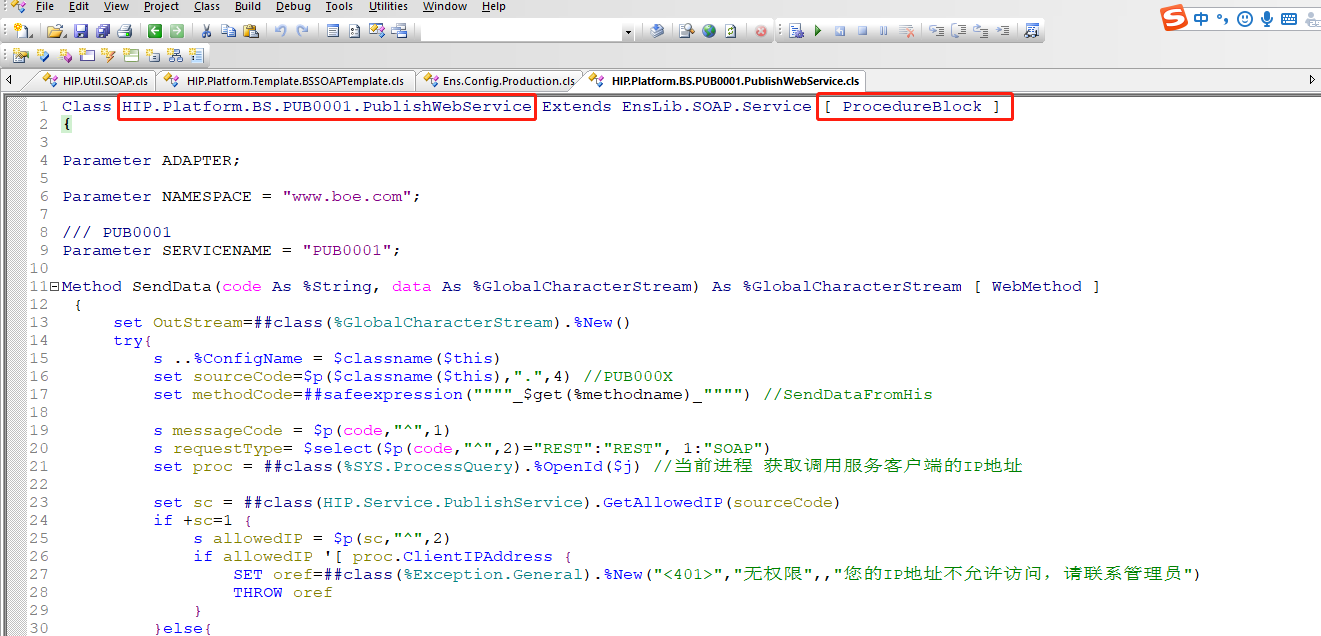 打开Portal管理界面,Production配置,可看到该服务已添加至Production中,如下:
 可直接通过soapUI调用,地址
http://localhost:57772/csp/hip/HIP.Platform.BS.PUB0001.PublishWebService.CLS?WSDL=1
可直接通过soapUI调用,地址
http://localhost:57772/csp/hip/HIP.Platform.BS.PUB0001.PublishWebService.CLS?WSDL=1 InterSystems消息查看

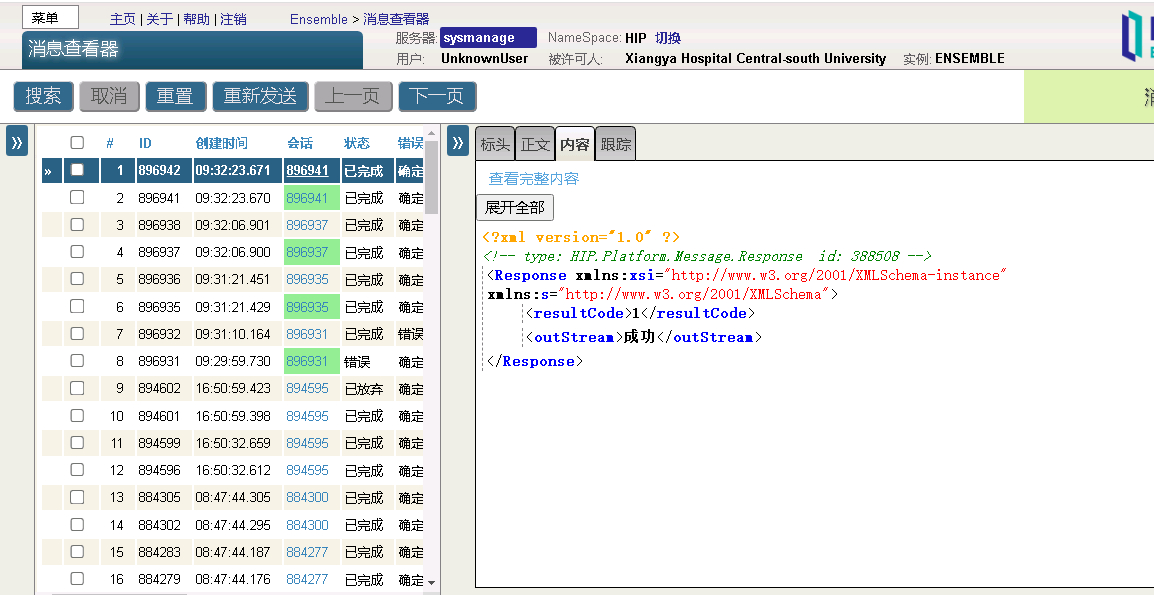
 ###五、 结论与猜想
同理,BO也可通过该方法实现自动生成,另可通过建立REST服务或WebService服务的方式通过前端调用该方法实现前端自动生成BS、BP、BO,以简化用户操作,但该方法存在问题点,如BP都为公用单个BP,消息并发量大时可能导致BP堵塞问题,可能实现的解决方法为前端先单独调用接口创建BP,后生成BS,再通过配置实现BS到BP的关联,大家感兴趣可自行尝试,以上,谢谢!
###五、 结论与猜想
同理,BO也可通过该方法实现自动生成,另可通过建立REST服务或WebService服务的方式通过前端调用该方法实现前端自动生成BS、BP、BO,以简化用户操作,但该方法存在问题点,如BP都为公用单个BP,消息并发量大时可能导致BP堵塞问题,可能实现的解决方法为前端先单独调用接口创建BP,后生成BS,再通过配置实现BS到BP的关联,大家感兴趣可自行尝试,以上,谢谢!
.png)
.png)
.png)