1. IRIS RAG Demo

这是 IRIS 与 RAG(检索增强生成)示例的一个简单演示。
后端是使用 IRIS 和 IoP用 Python 编写的,LLM 模型是 orca-mini 并由 ollama 服务器提供。
前端是用 Streamlit 编写的聊天机器人。
- IRIS RAG 演示](#1-iris-rag-demo)
- 1.1. 什么是 RAG](#11-what-is-rag)
- 1.2. 如何工作?
- 1.3. 安装演示](#13-installation-the-demo)
- 1.4. 使用方法
- 1.5. 演示如何运行](#15-演示如何运行)
- [1.5.1. 前端](#151-前端)
- 1.5.2. 后台
- [1.5.2.1. 业务服务](#1521-业务服务)
- [1.5.2.2. 业务流程](#1522-业务流程)
- [1.5.2.3. LLM 操作](#1523-the-llm-operation)
- 1.5.2.4. 矢量操作](#1524-the-vector-operation)
- 1.6. 一般性说明](#16-一般性说明)
1.1. 什么是 RAG?
RAG 是 Retrieval Augmented Generation(检索增强生成)的缩写,它带来了使用带有知识库的 LLM 模型(GPT-3.5/4、Mistral、Orca 等)的能力。
为什么它很重要? 因为它允许使用知识库来回答问题,并使用 LLM 来生成答案。
例如,如果你直接向 LLM 询问**"grongier.pex 模块是什么?"**,它将无法回答,因为它不知道这个模块是什么(也许你也不知道🤪)。
但是,如果你向 RAG 提出同样的问题,它就能回答,因为它会使用知识库,知道 grongier.pex 模块是什么,从而找到答案。
既然你已经知道什么是 RAG,那就让我们来看看它是如何工作的。
1.2. 它是如何工作的?
首先,我们需要了解 LLMS 的工作原理。LLMS 经过训练,可以根据前一个单词预测下一个单词。因此,如果你给它一个句子,它就会尝试预测下一个词,以此类推。很简单吧?
要与 LLM 交互,通常需要给它一个提示,它就会生成句子的其余部分。例如,如果你给它一个提示 "什么是 grongier.pex 模块?
很抱歉,我对您提到的 Pex 模块并不熟悉。能否请您提供有关它的更多信息或上下文?
好的,不出所料,它不知道什么是 grongier.pex 模块。但如果我们给它一个包含答案的提示呢?例如,如果我们提示``什么是 grongier.pex 模块?它是一个可以让你做 X、Y 和 Z 的模块。`",它就会生成剩下的句子,看起来就像这样:
grongier.pex 模块是一个可以让你执行 X、Y 和 Z 的模块。
好了,现在它知道什么是 grongier.pex 模块了。
但如果我们不知道 grongier.pex 模块是什么呢?我们怎样才能给它一个包含答案的提示呢?
这就需要知识库了。
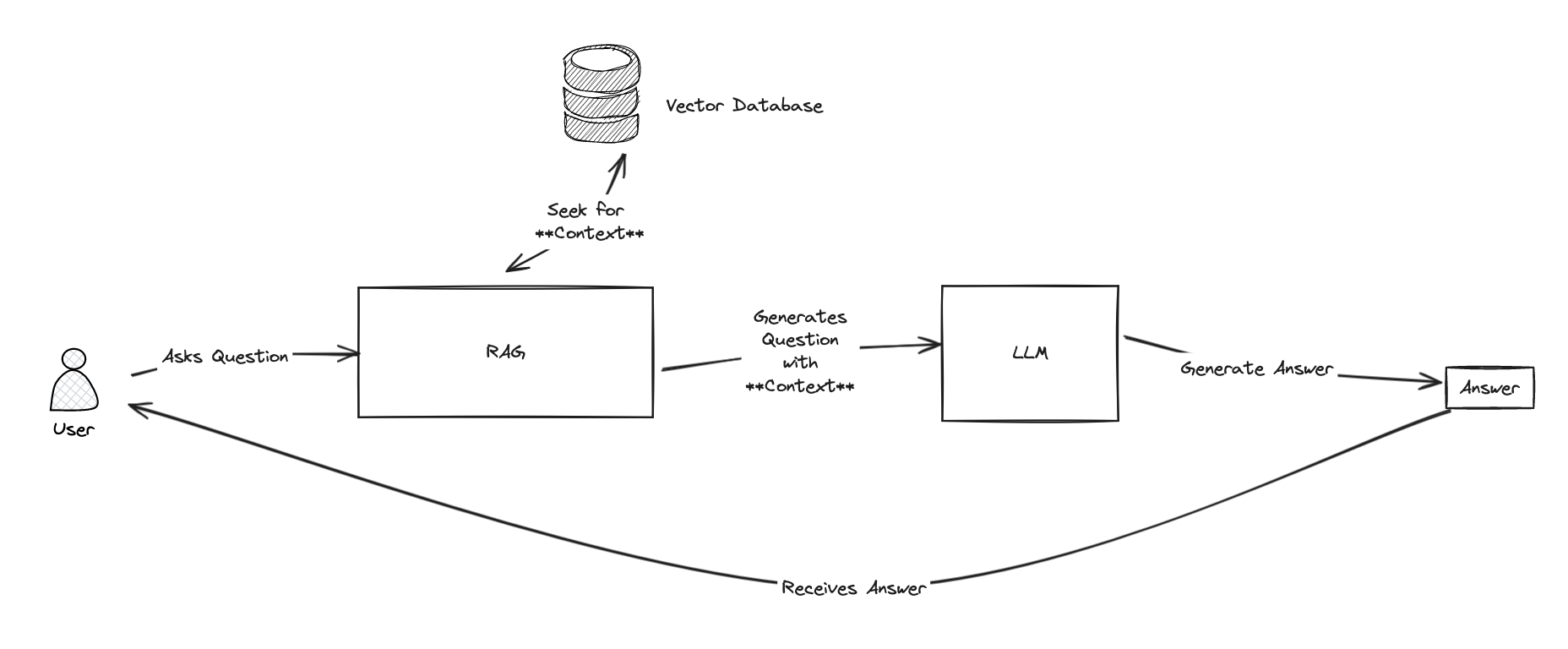
RAG 的整个思路是使用知识库找到上下文,然后使用 LLM 生成答案。
为了找到上下文,RAG 将使用一个**知识库。
1.3.安装演示
只需克隆存储库并运行“docker-compose up”命令即可。
git clone https://github.com/grongierisc/iris-rag-demo
cd iris-rag-demo
docker-compose up
⚠️ 一切都是本地的,没有任何东西发送到云端,所以请耐心等待,可能需要几分钟才能开始。
1.4.用法
演示开始后,您可以在 http://localhost:8051 访问前端。
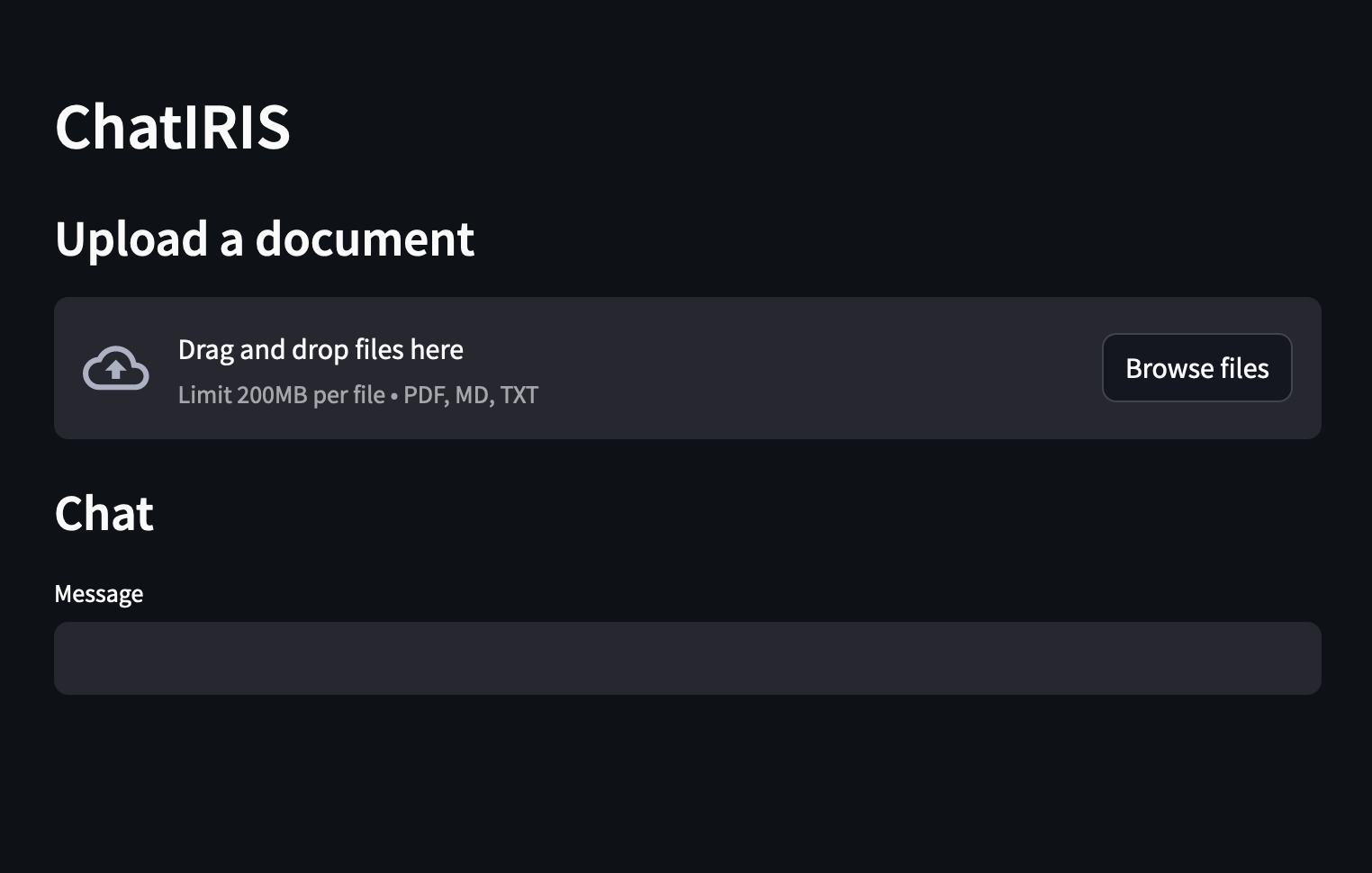
你可以提出有关「综合注册资讯系统」的问题,例如:
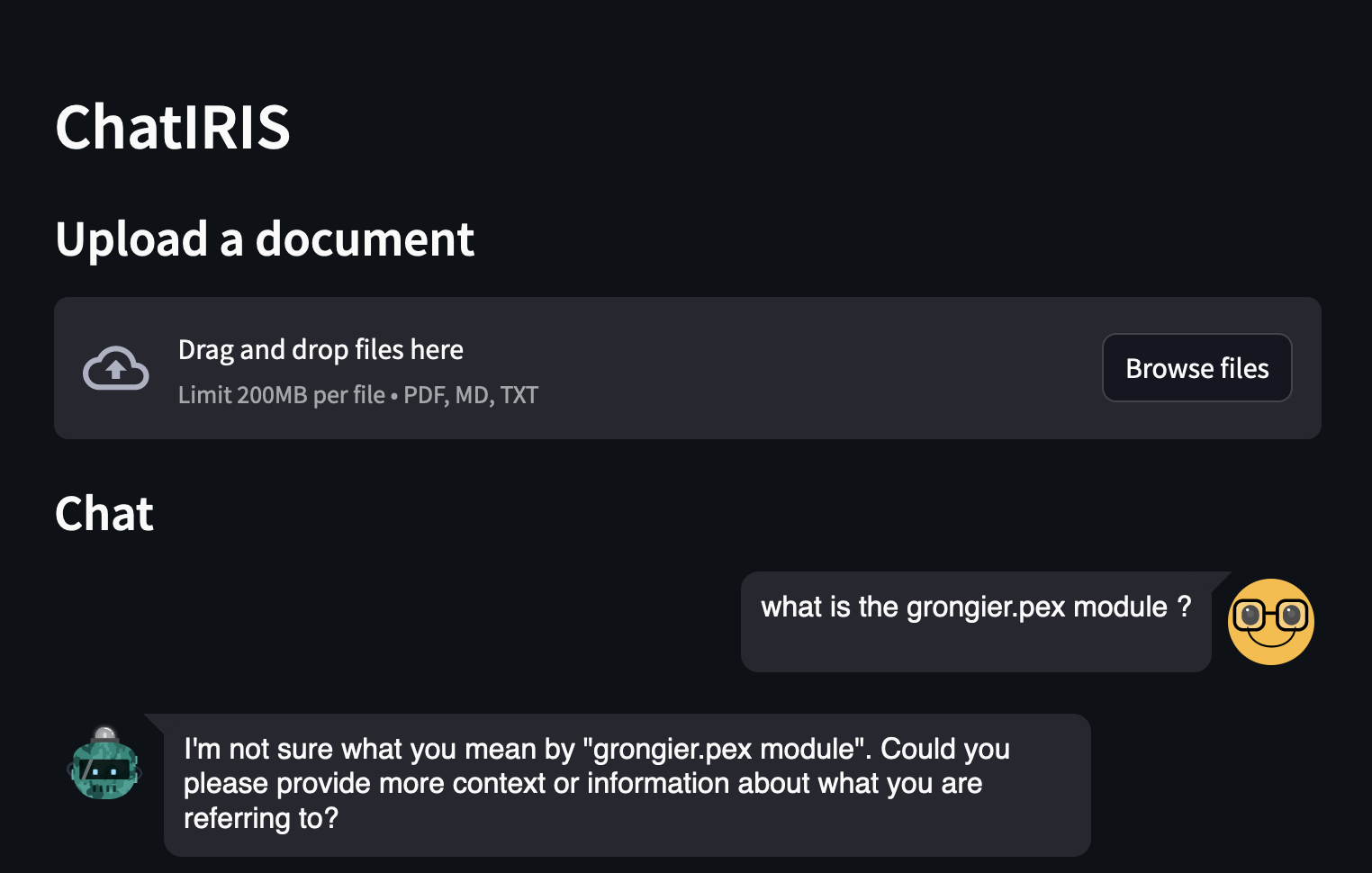
正如你所看到的,答案不是很好,因为 LLM 不知道什么是 grongier.pex 模块。
现在,让我们尝试使用 RAG:
上传“grongier.pex”模块文档,它位于“docs”文件夹中,文件“grongier.pex.md”。
并问同样的问题:
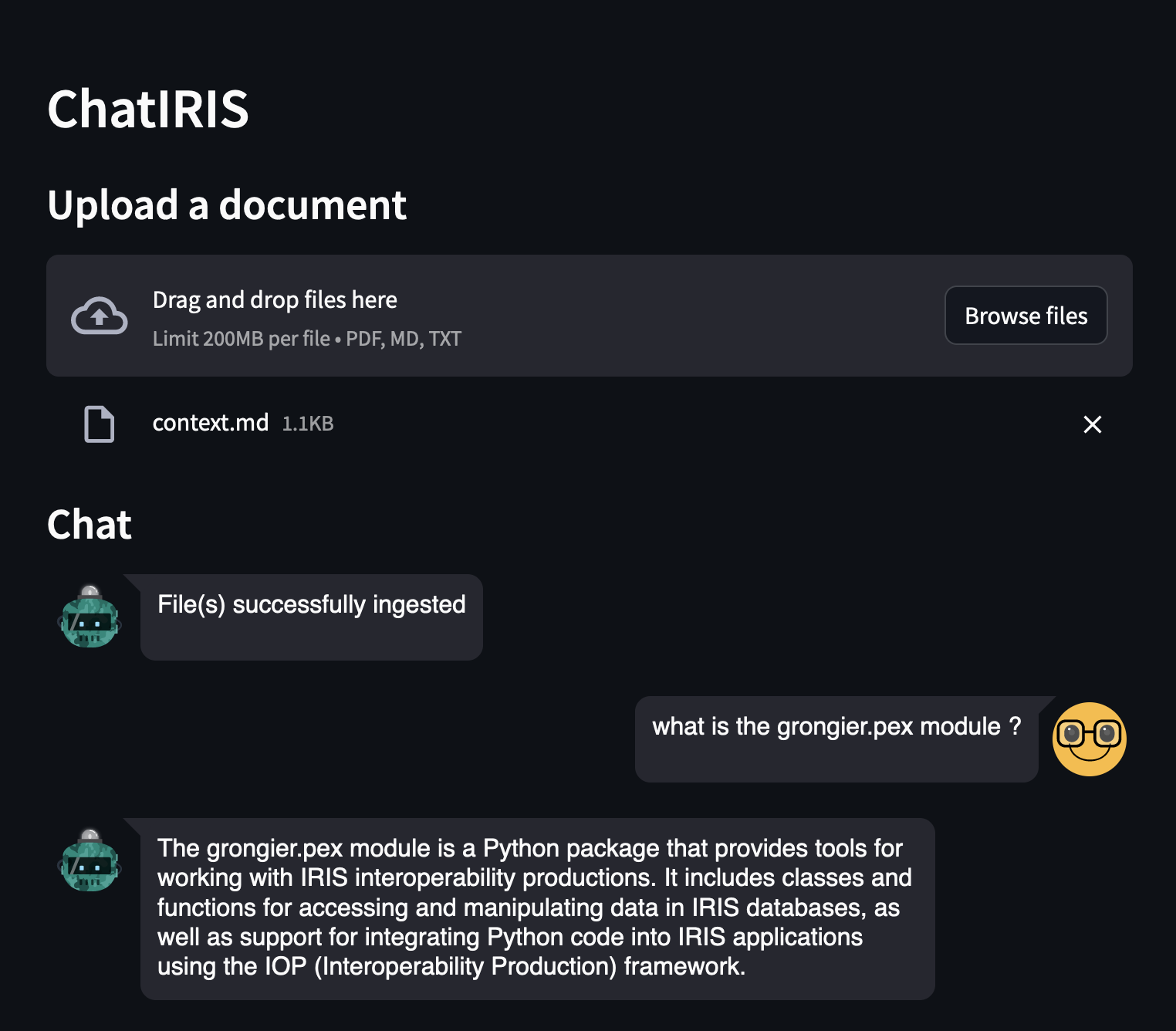
正如你所看到的,答案要好得多,因为 LLM 现在知道什么是 grongier.pex 模块。
您可以在日志中看到详细信息:
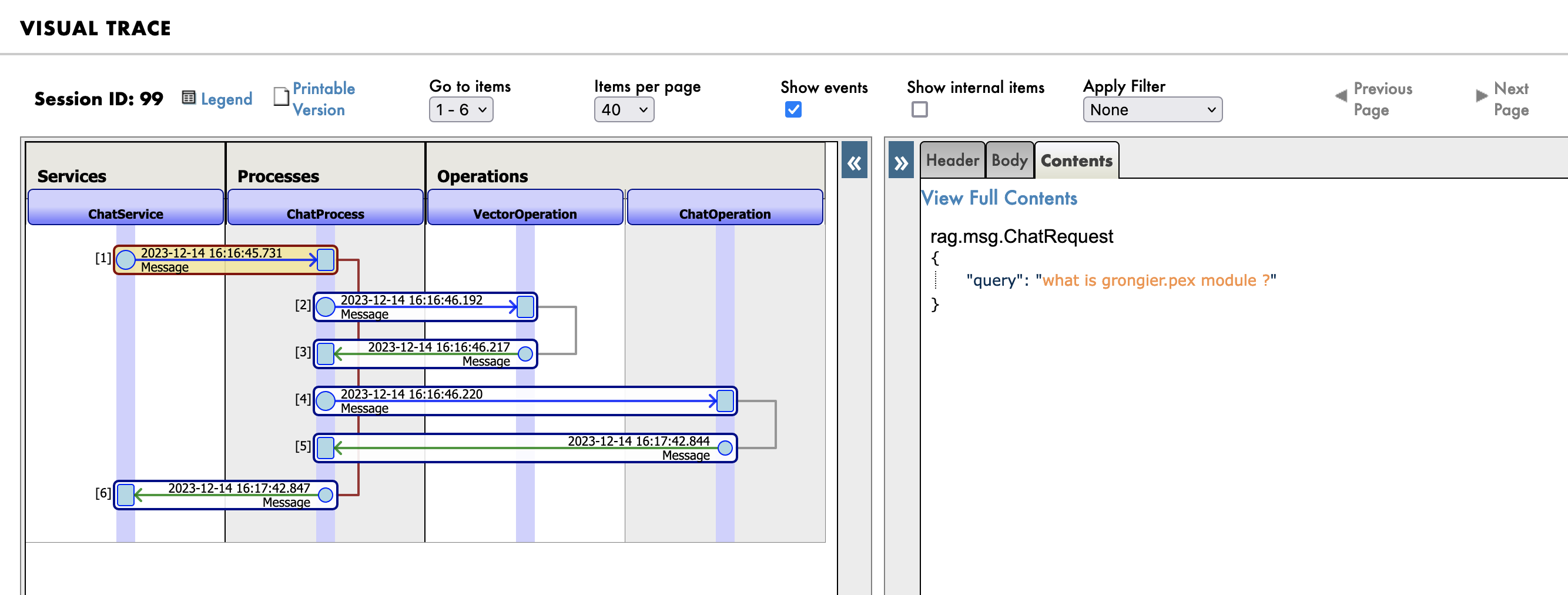
转到管理门户, http://localhost:53795/csp/irisapp/EnsPortal.ProductionConfig.zen?$NAMESPACE=IRISAPP&$NAMESPACE=IRISAPP&,然后单击“消息”选项卡。
首先,您将看到发送到 RAG 进程的消息:
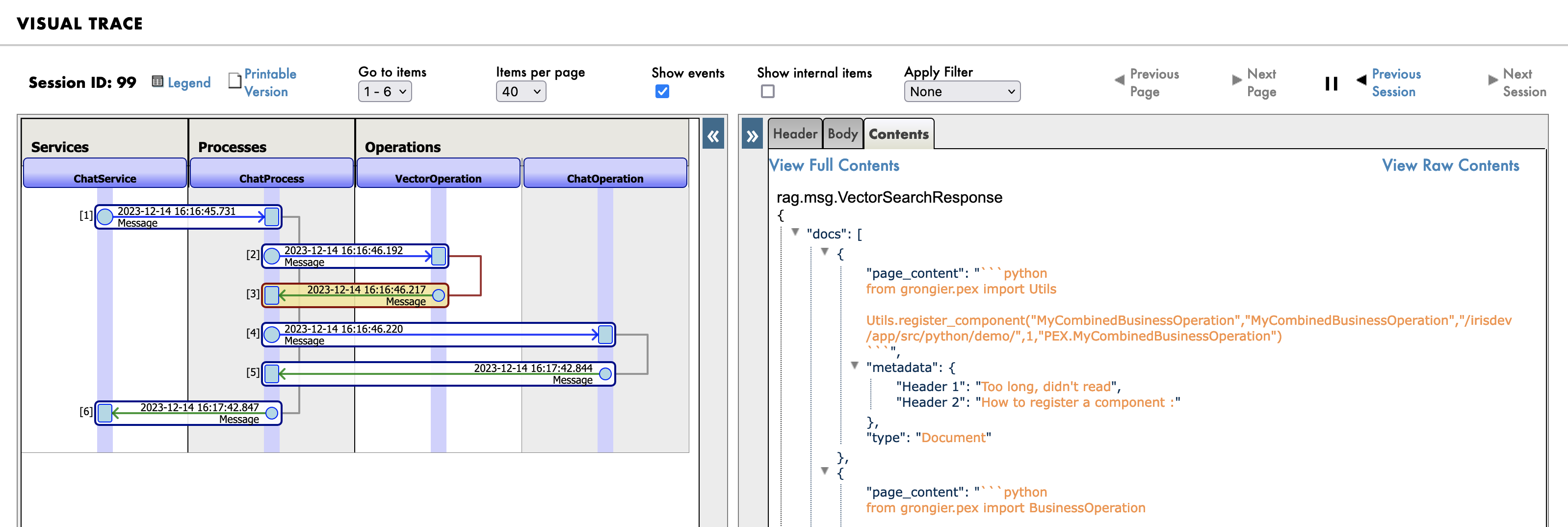
然后是知识库(向量数据库)中的搜索查询:
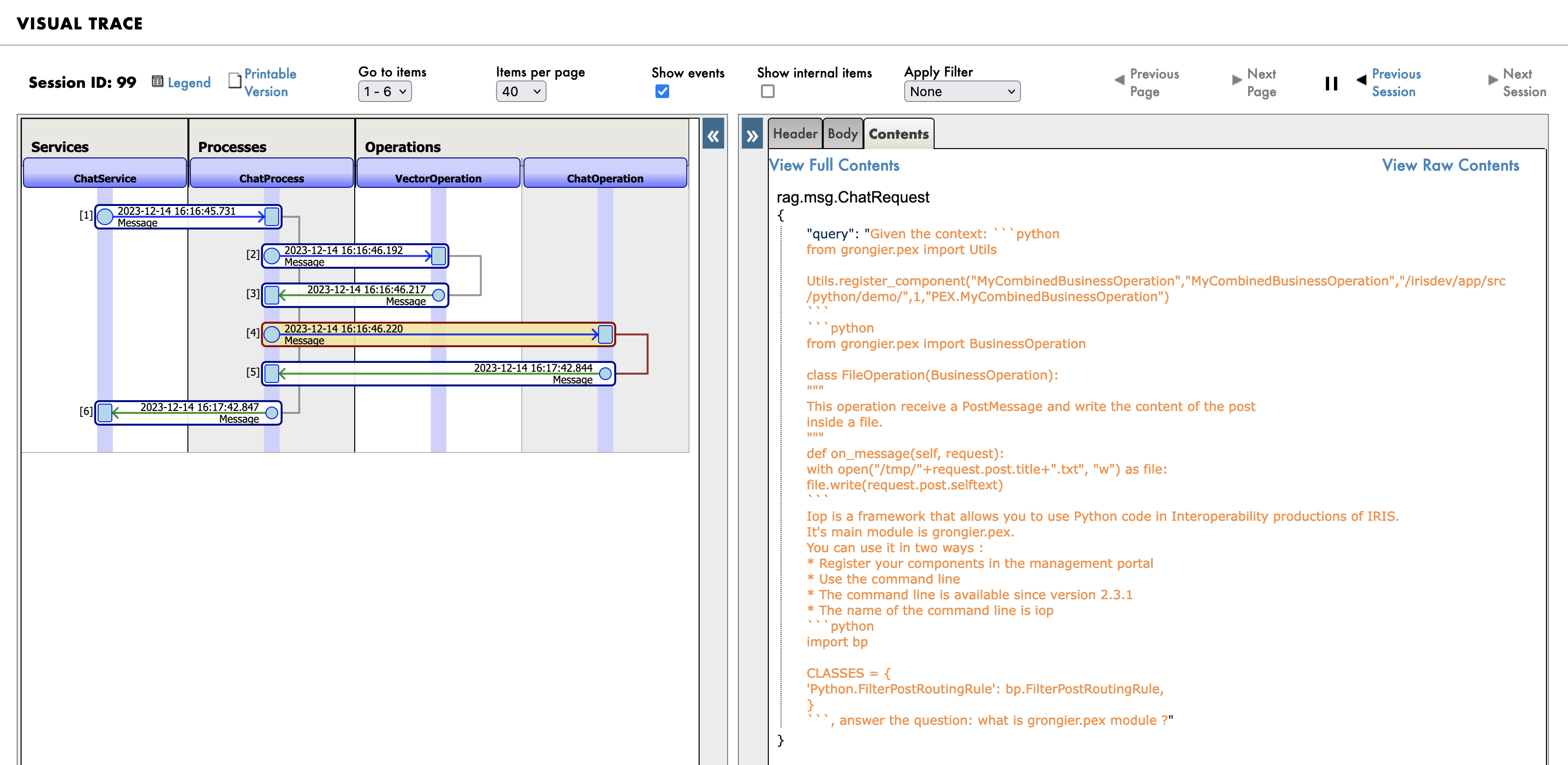
最后,发送给 LLM 的新提示:
1.5.这个Demo如何工作?
该演示由 3 个部分组成:
- 前端,用 Streamlit 编写
- 后端,用 Python 和 IRIS 编写
- 知识库 Chroma 向量数据库
- LLM,Orca-mini,由 Ollama 服务器提供服务
1.5.1.前端
前端是用 Streamlit 编写的,它是一个简单的聊天机器人,可让您提出问题。
这里没什么花哨的,只是一个简单的聊天机器人。
import os
import tempfile
import time
import streamlit as st
from streamlit_chat import message

from grongier.pex import Director

_service = Director.create_python_business_service("ChatService")

st.set_page_config(page_title="ChatIRIS")


def display_messages():
    st.subheader("Chat")
    for i, (msg, is_user) in enumerate(st.session_state["messages"]):
        message(msg, is_user=is_user, key=str(i))


def process_input():
    if st.session_state["user_input"] and len(st.session_state["user_input"].strip()) > 0:
        user_text = st.session_state["user_input"].strip()
        with st.spinner(f"Thinking about {user_text}"):
            rag_enabled = False
            if len(st.session_state["file_uploader"]) > 0:
                rag_enabled = True
            time.sleep(1) # help the spinner to show up
            agent_text = _service.ask(user_text, rag_enabled)

        st.session_state["messages"].append((user_text, True))
        st.session_state["messages"].append((agent_text, False))


def read_and_save_file():

    for file in st.session_state["file_uploader"]:
        with tempfile.NamedTemporaryFile(delete=False,suffix=f".{file.name.split('.')[-1]}") as tf:
            tf.write(file.getbuffer())
            file_path = tf.name

        with st.spinner(f"Ingesting {file.name}"):
            _service.ingest(file_path)
        os.remove(file_path)

    if len(st.session_state["file_uploader"]) > 0:
        st.session_state["messages"].append(
            ("File(s) successfully ingested", False)
        )

    if len(st.session_state["file_uploader"]) == 0:
        _service.clear()
        st.session_state["messages"].append(
            ("Clearing all data", False)
        )

def page():
    if len(st.session_state) == 0:
        st.session_state["messages"] = []
        _service.clear()

    st.header("ChatIRIS")

    st.subheader("Upload a document")
    st.file_uploader(
        "Upload document",
        type=["pdf", "md", "txt"],
        key="file_uploader",
        on_change=read_and_save_file,
        label_visibility="collapsed",
        accept_multiple_files=True,
    )

    display_messages()
    st.text_input("Message", key="user_input", on_change=process_input)


if __name__ == "__main__":
    page()
💡 我只是在用 :
_service = Director.create_python_business_service("ChatService")
来创建一个前后端之间的绑定.
ChatService 只是互操作性生产中的简单业务服务BS。
1.5.2.后端
后端是用 Python 和 IRIS 编写的。
它由3个部分组成:
1.5.2.1.业务服务BS
业务服务是一个简单的业务服务,它允许:
from grongier.pex import BusinessService

from rag.msg import ChatRequest, ChatClearRequest, FileIngestionRequest

class ChatService(BusinessService):

    def on_init(self):
        if not hasattr(self, "target_chat"):
            self.target_chat = "ChatProcess"
        if not hasattr(self, "target_vector"):
            self.target_vector = "VectorOperation"

    def ingest(self, file_path: str):
        # build message
        msg = FileIngestionRequest(file_path=file_path)
        # send message
        self.send_request_sync(self.target_vector, msg)

    def ask(self, query: str, rag: bool = False):
        # build message
        msg = ChatRequest(query=query)
        # send message
        response = self.send_request_sync(self.target_chat, msg)
        # return response
        return response.response

    def clear(self):
        # build message
        msg = ChatClearRequest()
        # send message
        self.send_request_sync(self.target_vector, msg)
基本上,它只是操作和过程之间的传递。
1.5.2.2.业务流程
业务流程是一个简单的过程,允许在需要时搜索知识库。
from grongier.pex import BusinessProcess

from rag.msg import ChatRequest, ChatResponse, VectorSearchRequest

class ChatProcess(BusinessProcess):
    """
    the aim of this process is to generate a prompt from a query
    if the vector similarity search returns a document, then we use the document's content as the prompt
    if the vector similarity search returns nothing, then we use the query as the prompt
    """
    def on_init(self):
        if not hasattr(self, "target_vector"):
            self.target_vector = "VectorOperation"
        if not hasattr(self, "target_chat"):
            self.target_chat = "ChatOperation"

        # prompt template
        self.prompt_template = "Given the context: \n {context} \n Answer the question: {question}"


    def ask(self, request: ChatRequest):
        query = request.query
        prompt = ""
        # build message
        msg = VectorSearchRequest(query=query)
        # send message
        response = self.send_request_sync(self.target_vector, msg)
        # if we have a response, then use the first document's content as the prompt
        if response.docs:
            # add each document's content to the context
            context = "\n".join([doc['page_content'] for doc in response.docs])
            # build the prompt
            prompt = self.prompt_template.format(context=context, question=query)
        else:
            # use the query as the prompt
            prompt = query
        # build message
        msg = ChatRequest(query=prompt)
        # send message
        response = self.send_request_sync(self.target_chat, msg)
        # return response
        return response
这真的很简单,它只是向知识库发送一条消息来搜索文档。
如果 知识库 返回文档,则会使用文档内容作为提示,否则会使用查询作为提示。
1.5.2.3.LLM 操作
LLM 操作是一个简单的操作,可以生成答案。
class ChatOperation(BusinessOperation):

    def __init__(self):
        self.model = None

    def on_init(self):
        self.model = Ollama(base_url="http://ollama:11434",model="orca-mini")

    def ask(self, request: ChatRequest):
        return ChatResponse(response=self.model(request.query))
这一步也很简单,它只是向 LLM 发送一条消息来生成答案。
1.5.2.4.Vector 操作
向量操作是一个简单的操作,允许摄取文档、搜索文档和清除向量数据库。
class VectorOperation(BusinessOperation):

    def __init__(self):
        self.text_splitter = None
        self.vector_store = None

    def on_init(self):
        self.text_splitter = RecursiveCharacterTextSplitter(chunk_size=1024, chunk_overlap=100)
        self.vector_store = Chroma(persist_directory="vector",embedding_function=FastEmbedEmbeddings())

    def ingest(self, request: FileIngestionRequest):
        file_path = request.file_path
        file_type = self._get_file_type(file_path)
        if file_type == "pdf":
            self._ingest_pdf(file_path)
        elif file_type == "markdown":
            self._ingest_markdown(file_path)
        elif file_type == "text":
            self._ingest_text(file_path)
        else:
            raise Exception(f"Unknown file type: {file_type}")

    def clear(self, request: ChatClearRequest):
        self.on_tear_down()

    def similar(self, request: VectorSearchRequest):
        # do a similarity search
        docs = self.vector_store.similarity_search(request.query)
        # return the response
        return VectorSearchResponse(docs=docs)

    def on_tear_down(self):
        docs = self.vector_store.get()
        for id in docs['ids']:
            self.vector_store.delete(id)

    def _get_file_type(self, file_path: str):
        if file_path.lower().endswith(".pdf"):
            return "pdf"
        elif file_path.lower().endswith(".md"):
            return "markdown"
        elif file_path.lower().endswith(".txt"):
            return "text"
        else:
            return "unknown"

    def _store_chunks(self, chunks):
        ids = [str(uuid.uuid5(uuid.NAMESPACE_DNS, doc.page_content)) for doc in chunks]
        unique_ids = list(set(ids))
        self.vector_store.add_documents(chunks, ids = unique_ids)

    def _ingest_text(self, file_path: str):
        docs = TextLoader(file_path).load()
        chunks = self.text_splitter.split_documents(docs)
        chunks = filter_complex_metadata(chunks)

        self._store_chunks(chunks)

    def _ingest_pdf(self, file_path: str):
        docs = PyPDFLoader(file_path=file_path).load()
        chunks = self.text_splitter.split_documents(docs)
        chunks = filter_complex_metadata(chunks)

        self._store_chunks(chunks)

    def _ingest_markdown(self, file_path: str):
        # Document loader
        docs = TextLoader(file_path).load()

        # MD splits
        headers_to_split_on = [
            ("#", "Header 1"),
            ("##", "Header 2"),
        ]

        markdown_splitter = MarkdownHeaderTextSplitter(headers_to_split_on=headers_to_split_on)
        md_header_splits = markdown_splitter.split_text(docs[0].page_content)

        # Split
        chunks = self.text_splitter.split_documents(md_header_splits)
        chunks = filter_complex_metadata(chunks)

        self._store_chunks(chunks)
如果文档太大,那么向量数据库将无法存储它们,因此我们需要将它们拆分为块。
如果文档是 PDF,那么我们将使用“PyPDFLoader”来加载 PDF,否则我们将使用“TextLoader”来加载文档。
然后,我们将使用“RecursiveCharacterTextSplitter”将文档拆分为块。
最后,我们将块存储到向量数据库中。
如果文档是 Markdown,那么我们将使用“MarkdownHeaderTextSplitter”将文档拆分为块。我们还使用标题将文档拆分为块。
1.6.A. 总 论
所有这些都可以通过“langchains”来完成,但我想向你展示如何使用互操作性框架来做到这一点。并让每个人都更容易理解它是如何工作的。