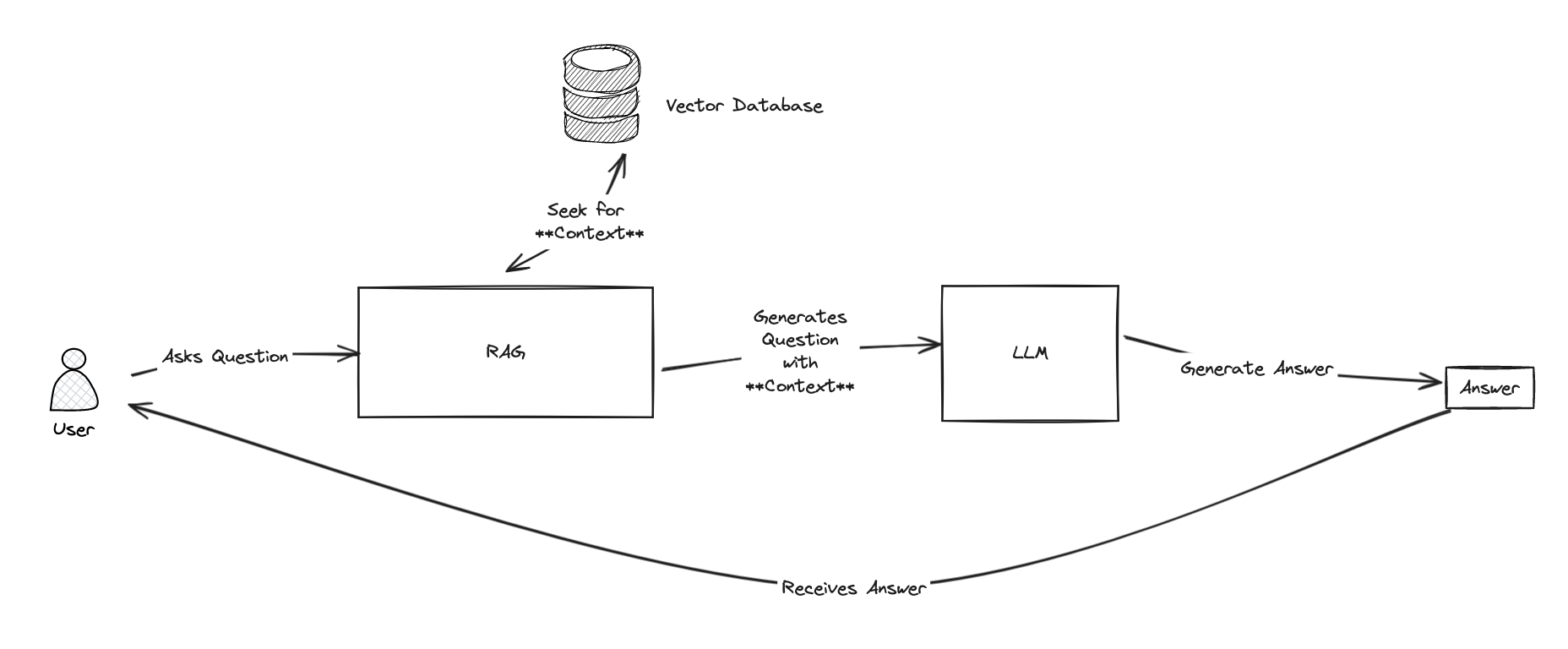
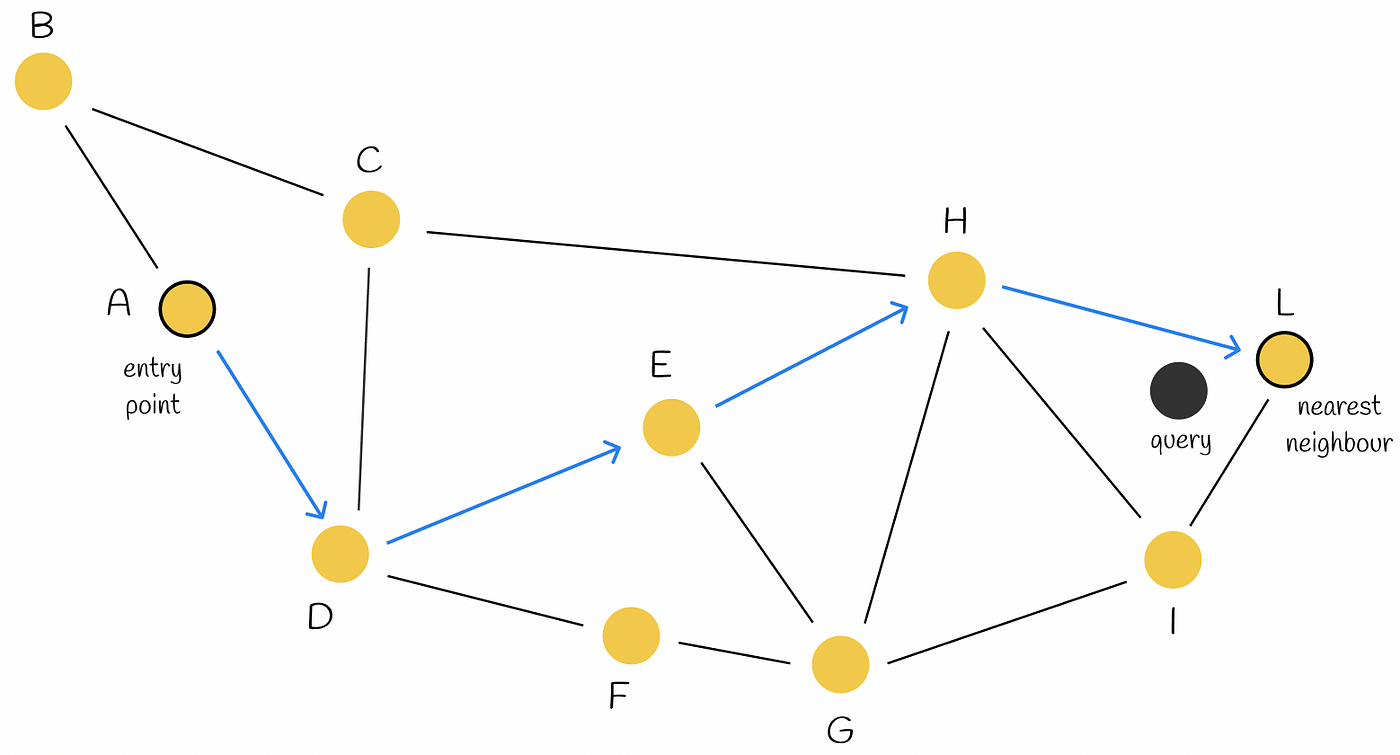
为了进行说明,我们来创建第一个工具。 这个工具将帮助智能体根据电子邮件内容划分 IT 支持工单的优先级:
    from langchain_core.tools import tool

    @tool
    def classify_priority(email_body: str) -> str:
        """Classify the priority of an IT support ticket based on email content."""
        prompt = ChatPromptTemplate.from_template(
            """Analyze this IT support email and classify its priority as High, Medium, or Low.

            High: System outages, security breaches, critical business functions down
            Medium: Non-critical issues affecting productivity, software problems
            Low: General questions, requests, minor issues

            Email: {email}

            Respond with only: High, Medium, or Low"""
        )
        chain = prompt | llm
        response = chain.invoke({"email": email_body})
        return response.content.strip()
太棒了! 现在,我们有一个提示,指示 AI 接收电子邮件正文,对其进行分析,并将其优先级分为“高”、“中”或“低”。
就是这样! 您刚刚编写了一个智能体可以调用的工具!
接下来,我们创建一个类似的工具来识别支持请求的主要主题(或类别):
    @tool
    def identify_topic(email_body: str) -> str:
        """Identify the main topic/category of the IT support request."""
        prompt = ChatPromptTemplate.from_template(
            """Analyze this IT support email and identify the main topic category.

            Categories: password_reset, vpn, software_request, hardware, email, network, printer, other

            Email: {email}

            Respond with only the category name (lowercase with underscores)."""
        )
        chain = prompt | llm
        response = chain.invoke({"email": email_body})
        return response.content.strip()
    @tool
    def make_escalation_decision(email_body: str, priority: str, topic: str) -> str:
        """Decide whether to auto-respond or escalate to IT team."""
        prompt = ChatPromptTemplate.from_template(
            """Based on this IT support ticket, decide whether to:
            - "auto_respond": Send an automated response for simple/common or medium priority issues
            - "escalate": Escalate to the IT team for complex/urgent issues

            Email: {email}
            Priority: {priority}
            Topic: {topic}

            Consider: High priority items usually require escalation, while complex technical issues necessitate human review.

            Respond with only: auto_respond or escalate"""
        )
        chain = prompt | llm
        response = chain.invoke({
            "email": email_body,
            "priority": priority,
            "topic": topic
        })
        return response.content.strip()
    @tool
    def retrieve_examples(email_body: str) -> str:
        """Retrieve relevant examples from past responses based on email_body."""
        try:
            examples = iris.cls(__name__).Retrieve(email_body)
            return examples if examples else "No relevant examples found."
        except:
            return "No relevant examples found."

    @tool
    def generate_reply(email_body: str, topic: str, examples: str) -> str:
        """Generate a suggested reply based on the email, topic, and RAG examples."""
        prompt = ChatPromptTemplate.from_template(
            """Generate a professional IT support response based on:

            Original Email: {email}
            Topic Category: {topic}
            Example Response: {examples}

            Create a helpful, professional response that addresses the user's concern.
            Keep it concise and actionable."""
        )
        chain = prompt | llm
        response = chain.invoke({
            "email": email_body,
            "topic": topic,
            "examples": examples
        })
        return response.content.strip()
现在,我们为这些新工具定义相应的节点:
    def decision_node(state: TicketState) -> TicketState:
        """Node to decide on escalation or auto-response."""
        decision = make_escalation_decision.invoke({
            "email_body": state["email_body"],
            "priority": state["priority"],
            "topic": state["topic"]
        })
        return {"decision": decision}


    def rag_node(state: TicketState) -> TicketState:
        """Node to retrieve relevant examples using RAG."""
        examples = retrieve_examples.invoke({"email_body": state["email_body"]})
        return {"rag_examples": examples}

    def generate_reply_node(state: TicketState) -> TicketState:
        """Node to generate suggested reply."""
        reply = generate_reply.invoke({
            "email_body": state["email_body"],
            "topic": state["topic"],
            "examples": state["rag_examples"]
        })
        return {"suggested_reply": reply}


    def execute_action_node(state: TicketState) -> TicketState:
        """Node to execute final action based on decision."""
        if state["decision"] == "escalate":
            action = f"🚨 ESCALATED TO IT TEAM\nPriority: {state['priority']}\nTopic: {state['topic']}\nTicket created in system."
            print(f"[SYSTEM] Escalating ticket to IT team - Priority: {state['priority']}, Topic: {state['topic']}")
        else:
            action = f"✅ AUTO-RESPONSE SENT\nReply: {state['suggested_reply']}\nTicket logged for tracking."
            print(f"[SYSTEM] Auto-response sent to user - Topic: {state['topic']}")

        return {"final_action": action}


    workflow.add_node("make_decision", decision_node)
    workflow.add_node("rag", rag_node)
    workflow.add_node("generate_reply", generate_reply_node)
    workflow.add_node("execute_action", execute_action_node)
# src/python/article/dbapi_example.py
import iris

def run():
    # Connect to the IRIS database
# Open a connection to the server
    args = {
        'hostname':'127.0.0.1',
        'port': 1972,
        'namespace':'USER',
        'username':'SuperUser',
        'password':'SYS'
    }
    conn = iris.connect(**args)

    # Create a cursor
    cursor = conn.cursor()

    # Execute a query
    cursor.execute("SELECT 1")

    # Fetch all results
    results = cursor.fetchall()

    for row in results:
        print(row)

    # Close the cursor and connection
    cursor.close()
    conn.close()
if __name__ == "__main__":
    run()
# src/python/article/dbapi_community_example.py
import intersystems_iris.dbapi._DBAPI as dbapi

config = {
    "hostname": "localhost",
    "port": 1972,
    "namespace": "USER",
    "username": "_SYSTEM",
    "password": "SYS",
}

with dbapi.connect(**config) as conn:
    with conn.cursor() as cursor:
        cursor.execute("select ? as one, 2 as two", 1)   # second arg is parameter value
        for row in cursor:
            one, two = row
            print(f"one: {one}")
            print(f"two: {two}")
from sqlalchemy import create_engine, text

COMMUNITY_DRIVER_URL = "iris://_SYSTEM:SYS@localhost:1972/USER"
OFFICIAL_DRIVER_URL = "iris+intersystems://_SYSTEM:SYS@localhost:1972/USER"
EMBEDDED_PYTHON_DRIVER_URL = "iris+emb:///USER"

def run(driver):
    # Create an engine using the official driver
    engine = create_engine(driver)

    with engine.connect() as connection:
        # Execute a query
        result = connection.execute(text("SELECT 1 AS one, 2 AS two"))

        for row in result:
            print(f"one: {row.one}, two: {row.two}")

if __name__ == "__main__":
    run(OFFICIAL_DRIVER_URL)
    run(COMMUNITY_DRIVER_URL)
    run(EMBEDDED_PYTHON_DRIVER_URL)
Class Article.DebuggingExample Extends %RegisteredObject
{
ClassMethod Run() As %Status
{
    set myScript = ##class(IOP.Wrapper).Import("my_script", "/irisdev/app/src/python/article/", 55550) // Adjust the path to your module
    Do myScript.run()
    Quit $$$OK
}
}
import os
import tempfile
import time
import streamlit as st
from streamlit_chat import message

from grongier.pex import Director

_service = Director.create_python_business_service("ChatService")

st.set_page_config(page_title="ChatIRIS")


def display_messages():
    st.subheader("Chat")
    for i, (msg, is_user) in enumerate(st.session_state["messages"]):
        message(msg, is_user=is_user, key=str(i))


def process_input():
    if st.session_state["user_input"] and len(st.session_state["user_input"].strip()) > 0:
        user_text = st.session_state["user_input"].strip()
        with st.spinner(f"Thinking about {user_text}"):
            rag_enabled = False
            if len(st.session_state["file_uploader"]) > 0:
                rag_enabled = True
            time.sleep(1) # help the spinner to show up
            agent_text = _service.ask(user_text, rag_enabled)

        st.session_state["messages"].append((user_text, True))
        st.session_state["messages"].append((agent_text, False))


def read_and_save_file():

    for file in st.session_state["file_uploader"]:
        with tempfile.NamedTemporaryFile(delete=False,suffix=f".{file.name.split('.')[-1]}") as tf:
            tf.write(file.getbuffer())
            file_path = tf.name

        with st.spinner(f"Ingesting {file.name}"):
            _service.ingest(file_path)
        os.remove(file_path)

    if len(st.session_state["file_uploader"]) > 0:
        st.session_state["messages"].append(
            ("File(s) successfully ingested", False)
        )

    if len(st.session_state["file_uploader"]) == 0:
        _service.clear()
        st.session_state["messages"].append(
            ("Clearing all data", False)
        )

def page():
    if len(st.session_state) == 0:
        st.session_state["messages"] = []
        _service.clear()

    st.header("ChatIRIS")

    st.subheader("Upload a document")
    st.file_uploader(
        "Upload document",
        type=["pdf", "md", "txt"],
        key="file_uploader",
        on_change=read_and_save_file,
        label_visibility="collapsed",
        accept_multiple_files=True,
    )

    display_messages()
    st.text_input("Message", key="user_input", on_change=process_input)


if __name__ == "__main__":
    page()
from grongier.pex import BusinessProcess

from rag.msg import ChatRequest, ChatResponse, VectorSearchRequest

class ChatProcess(BusinessProcess):
    """
    the aim of this process is to generate a prompt from a query
    if the vector similarity search returns a document, then we use the document's content as the prompt
    if the vector similarity search returns nothing, then we use the query as the prompt
    """
    def on_init(self):
        if not hasattr(self, "target_vector"):
            self.target_vector = "VectorOperation"
        if not hasattr(self, "target_chat"):
            self.target_chat = "ChatOperation"

        # prompt template
        self.prompt_template = "Given the context: \n {context} \n Answer the question: {question}"


    def ask(self, request: ChatRequest):
        query = request.query
        prompt = ""
        # build message
        msg = VectorSearchRequest(query=query)
        # send message
        response = self.send_request_sync(self.target_vector, msg)
        # if we have a response, then use the first document's content as the prompt
        if response.docs:
            # add each document's content to the context
            context = "\n".join([doc['page_content'] for doc in response.docs])
            # build the prompt
            prompt = self.prompt_template.format(context=context, question=query)
        else:
            # use the query as the prompt
            prompt = query
        # build message
        msg = ChatRequest(query=prompt)
        # send message
        response = self.send_request_sync(self.target_chat, msg)
        # return response
        return response






.png)


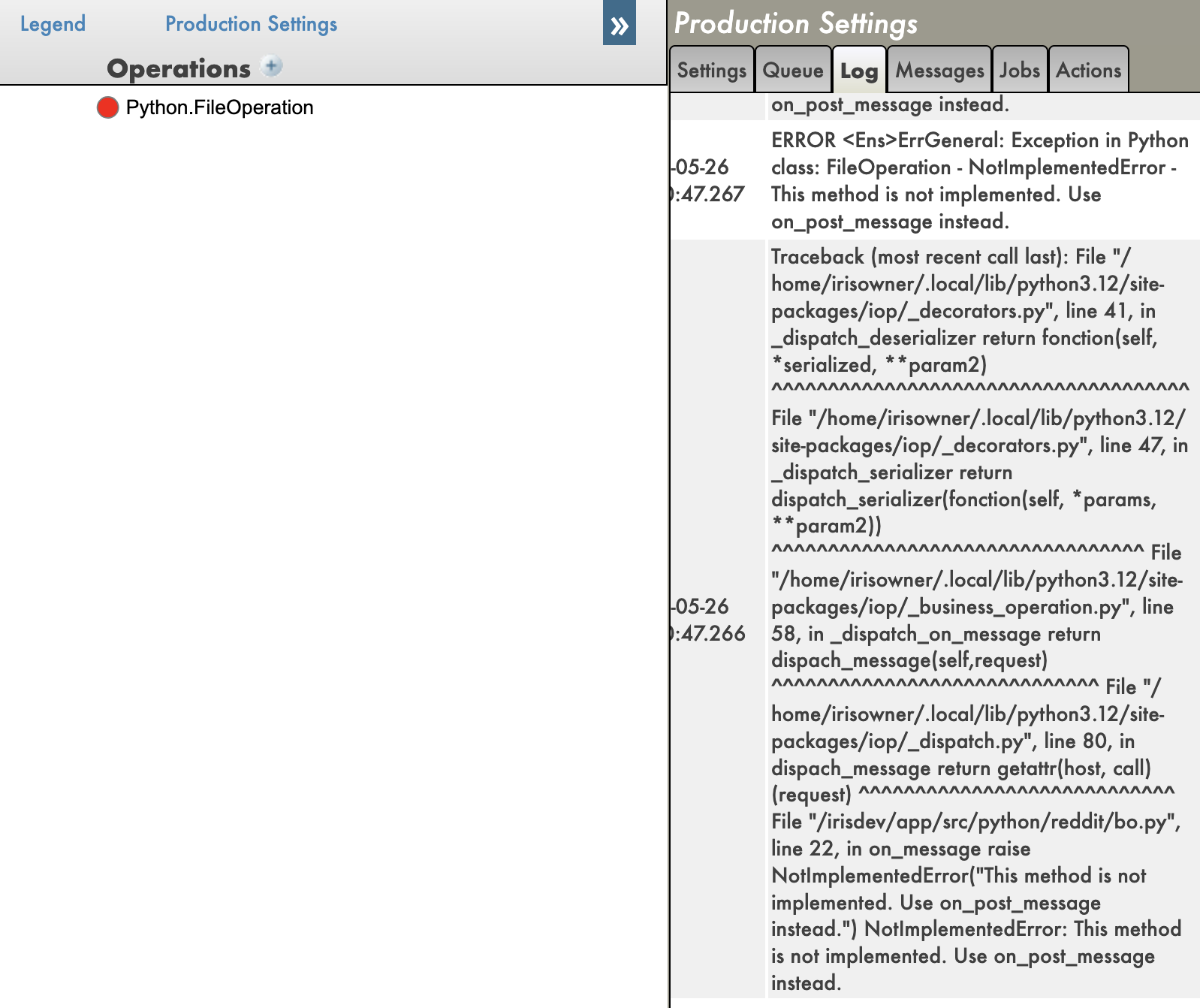
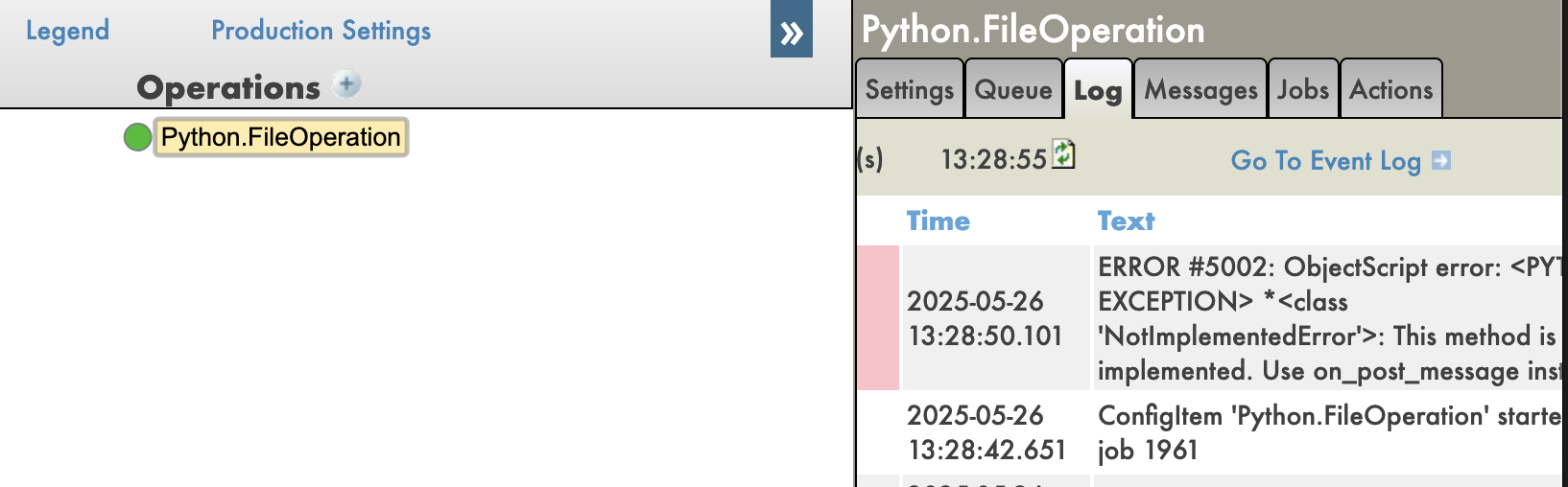


.png)
.jpg)